
Coinbase Review Scorecard
Before we dive in, here’s how this review rates Coinbase specifically through the lens of a low-budget user:
| Category | Score (Out of 10) | Notes |
| Ease of Use | 9/10 | Clean UI, beginner-friendly app |
| Fees (Simple Trade) | 3/10 | High flat fees hurt small trades badly |
| Fees (Advanced Trade) | 7/10 | Much better — maker-taker from 0.40%/0.60% |
| Minimum Deposit | 9/10 | No hard minimum; start with $2 |
| Security | 9/10 | 98% cold storage, 2FA, regulated exchange |
| Coin Selection | 8/10 | 240+ assets available |
| Customer Support | 6/10 | Good help docs, live support can be slow |
| Budget Friendliness Overall | 6/10 | Good platform, wrong default settings for small budgets |
Scores reflect the experience of a user trading at or below $500/month. Results change significantly depending on which Coinbase interface you use.
Table of Contents
1. Coinbase Review for Low-Budget Users
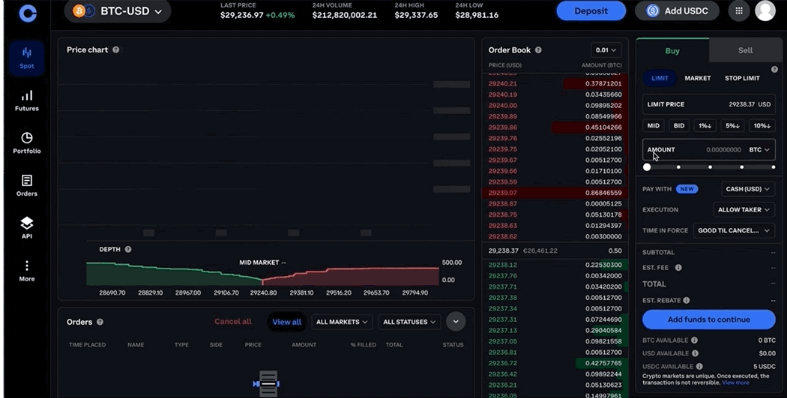
Let me be upfront with you. When I first tested Coinbase with a small deposit, I got hit with a $2.99 fee on a $50 purchase. That stings when your whole budget is $50. But here’s the thing , that was entirely my fault. I was using the wrong interface.
Coinbase is a genuinely powerful platform. It is publicly listed on NASDAQ, regulated across multiple jurisdictions, and trusted by millions of users worldwide. But it has a fee problem that specifically punishes people who are just starting with small amounts. Once you know how to navigate around it, the picture changes completely.
This review is written specifically for low-budget traders, people buying $10, $50, or $200 at a time. We’re going to look at fees with a microscope, dig into security, compare alternatives, and give you an honest verdict.
2. Can You Start Coinbase with Small Money?
Short answer: yes. Coinbase has no hard minimum deposit requirement to open an account. You can technically get started with as little as $2, depending on the asset you are buying. Bitcoin, for example, supports fractional purchases, so you don’t need to buy a whole coin.
When I tested this, I created a fresh account and funded it with a modest bank transfer. The process was smooth, identity verification took under five minutes, and the funds appeared within one business day using an ACH transfer.
That said, starting small is where things get tricky. Coinbase’s pricing structure is built around two very different interfaces, and most beginners land on the expensive one by default. More on that in a moment.
What you need to get started:
- A valid government-issued ID
- A phone number for 2FA verification
- A bank account or debit card for funding
- Patience for KYC verification (usually fast, occasionally longer)
The platform supports users in over 100 countries, though features vary by region. U.S. users have access to the broadest set of tools. (Coinbase Help)
3. Minimum Deposit Requirements
Coinbase does not publish a hard minimum deposit in the traditional sense. Instead, each asset has its own minimum purchase amount. For most coins, this is very low, often just a few dollars.
Here is what matters more than a minimum deposit: the minimum trade amount relative to the fees you’ll pay. If you deposit $5 and pay $0.99 in fees, you’ve immediately lost nearly 20% of your investment before the market has moved a single point.
This is the quiet trap that catches new users. The platform welcomes small deposits with open arms, but the fee structure on the standard interface makes small trades genuinely expensive on a percentage basis.
Practical minimums to consider:
| Trade Size | Simple Trade Fee | Effective Fee % |
| Under $10 | $0.99 flat | ~10%+ |
| $10 – $25 | $1.49 flat | ~6–15% |
| $25 – $50 | $1.99 flat | ~4–8% |
| $50 – $200 | $2.99 flat | ~1.5–6% |
| Over $200 | 1.49% (ACH) | 1.49% |
My finding? Don’t trade less than $30 at a time on Simple Trade. And honestly, switch to Coinbase Advanced as soon as possible, which I’ll explain under the fees section.
4. Low Trading Fees Explained
Here is where Coinbase becomes a tale of two platforms. And understanding the difference is probably the most valuable thing a low-budget trader can learn.
Simple Trade (the default) bundles a spread markup of roughly 0.50% into the quoted price, plus a visible transaction fee on top. In practice, this means your true cost on a small trade is often between 2% and 4.5% per transaction. That’s before you’ve even thought about market movement.
Coinbase Advanced Trade is a completely different experience. It uses a maker-taker model, the industry standard for professional trading. Starting fees sit at 0.60% for takers and 0.40% for makers, with no additional spread embedded in the price. Switching to Advanced Trade takes about 30 seconds and costs absolutely nothing. Yet most beginners never do it.
During my testing, I ran the same $200 trade through both interfaces. On Simple Trade with a debit card, the total cost came to roughly 4.49% ($8.98). On Advanced Trade using a limit order, I paid 0.40% ($0.80). Same amount, same asset, wildly different outcome.
The maker-taker model rewards patience. A maker order is a limit order; you set a price and wait for someone to match it. A taker order executes immediately at the market price. For low-budget users, placing limit orders on Advanced Trade is one of the simplest and most effective ways to cut trading costs.
5. How Much Will You Pay in Fees?
Let’s get specific. Below is a realistic fee breakdown based on different user behaviors.
Simple Trade — debit card
Casual buyer, default Coinbase interface
Monthly cost
$4.49 (4.49%)
Annual drag: $53.88
Advanced Trade — bank transfer
Budget buyer, optimised settings
Monthly cost
$0.60 (0.60%)
Annual drag: $7.20
That’s the difference between losing $53 and losing $7 per year in fees alone on a $100/month buying habit. Over five years, that gap compounds significantly.
Coinbase’s Simple Trade can carry both a variable fee and a spread built into the quoted price, making it considerably more expensive than Advanced Trade for routine purchases.
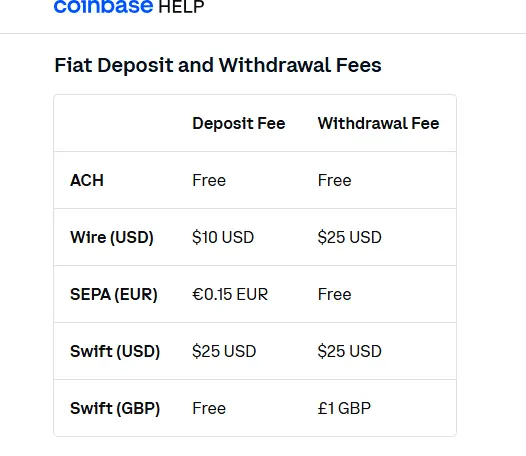
One thing that works in your favor: ACH transfers in the United States are free on Coinbase, making bank transfers the most cost-effective funding method for regular buyers.
Avoid debit cards unless you need instant access to your crypto. The 3.99% card fee is steep by any standard.
6. Best Features for Budget Traders
Coinbase doesn’t just exist to take your fees. It has genuine tools that work well for people starting with limited capital.
Recurring Buys. This is one of the most underrated features on the platform. You set an amount — say, $25 every Friday — and Coinbase handles the rest automatically. This is dollar-cost averaging on autopilot. You don’t need to time the market, watch charts, or make decisions during every crypto dip. It’s a genuinely useful tool for long-term, low-budget investing.
Coinbase Learn (Earn): Coinbase occasionally offers small amounts of crypto for completing educational modules. In practice, you’re talking about a few dollars per quiz, but for a beginner, it is a decent way to hold your first crypto without spending your own money. Availability varies by region and asset.
Coinbase Vault: If you are buying and holding (not actively trading), the Vault feature adds an extra time delay to withdrawals. It sounds annoying, but for long-term holders, it provides meaningful protection against impulsive sales during market crashes and unauthorized access attempts.
Coinbase Advanced Trade. We’ve covered this, but it deserves its own mention as a feature. The advanced interface gives budget users access to the order book, limit orders, and significantly lower fees. It’s available within the same account — no separate sign-up needed.
Mobile App Quality The Coinbase mobile app is clean, intuitive, and genuinely well-designed. For someone new to crypto, it removes the friction of getting started. In practice, this matters; platforms that confuse beginners tend to cause costly mistakes.
7. Pros and Cons for Small Traders
- ✓
No hard minimum deposit — start with just a few dollars
- ✓
Regulated and publicly listed — legal accountability that many exchanges lack
- ✓
Advanced Trade available free — professional-grade fees with zero extra cost
- ✓
Free ACH deposits — no fee to fund your account via bank transfer
- ✓
Strong mobile app — beginner-friendly interface
- ✓
240+ cryptocurrencies — solid selection for diversification
- ✓
Coinbase One Basic at $4.99/month — waives Simple Trade fees on first $500 in purchases per month
- ✗
Simple Trade fees are high — especially damaging for trades under $50
- ✗
Debit card fees hit 3.99% — one of the steeper card rates in the industry
- ✗
Spread is invisible — embedded in the quoted price, easy to miss
- ✗
Customer support can be slow — live help is not always fast for basic accounts
- ✗
Coinbase One savings are marginal at low volume — $4.99/month only makes sense if you trade consistently
- ✗
Not the cheapest alternative — Kraken and Binance offer lower base fees
8. Security for Low-Budget Users
Security is one area where Coinbase genuinely earns its reputation. Even if you’re only holding $50 worth of crypto, the protections in place are institution-grade.
Coinbase uses AES-256 encryption, two-factor authentication (2FA), and biometrics for customer login. About 98% of customer cryptocurrency funds are stored in cold wallets, with only 2% held in hot wallets for operational liquidity.
Cold storage means the vast majority of user assets are kept offline, physically disconnected from the internet, and therefore unreachable by remote hackers. This is the gold standard for exchange security.
Coinbase also uses secure multi-party computation (MPC) for digital-asset key management, splitting cryptographic key material into shares so the full key is never in one place at any given time.
On the regulatory side, Coinbase is registered as a money services business with FinCEN, holds state-level money transmitter licenses, is authorized by the UK’s Financial Conduct Authority (FCA), and in 2025 secured a MiCA license from Luxembourg’s financial regulator, allowing EU operations.
What about insurance?
This is where it gets nuanced. Coinbase carries crime insurance that protects a portion of digital currencies held across its storage systems against theft, including cybersecurity breaches. However, this policy does not cover losses resulting from unauthorized access to your personal account due to a breach or loss of your credentials.
For U.S. dollar balances, Coinbase pools customer funds in custodial accounts at FDIC-insured banks, making USD holdings potentially eligible for up to $250,000 in pass-through FDIC protection per depositor, but this applies only to cash, not cryptocurrency.
Practical security tips for budget users:
- Enable 2FA immediately — use an authenticator app, not SMS
- Avoid SMS-based 2FA if possible; SIM-swap attacks are a real risk
- Use the Vault feature for any holdings you plan to keep long-term
- Whitelist withdrawal addresses — it creates a 48-hour delay for new destinations
- Never share your recovery phrase or login credentials with anyone
9. Coinbase One — Is the Subscription Worth It?
Coinbase One is the platform’s subscription tier, and it comes up constantly in discussions about saving fees. Here’s the honest breakdown for budget users.
Since January 2026, Coinbase One has had three tiers. The Basic plan runs $4.99 per month and waives Simple Trade fees on the first $500 in monthly purchases. The Preferred plan costs $29.99 per month and extends zero-fee Simple Trade up to $10,000 per month, while also reducing the staking commission from 35% to 28.50%.
For someone buying $200 of crypto per month on Simple Trade: without the subscription, fees on that $200 run roughly $2.99–$8.00, depending on payment method. With Basic at $4.99/month, those fees disappear, but you’ve paid $4.99 for the privilege of saving maybe $3–4. The math barely works, and that’s being generous.
In practice, Coinbase One Basic becomes financially sensible around $300–$500 in monthly Simple Trade volume. Below that, switching to Advanced Trade for free is a far better deal than paying $4.99/month.
The Preferred tier at $29.99 starts to make sense only above $3,000 in monthly volume, where the staking discount and expanded fee waivers add meaningful real savings.
Bottom line: For most low-budget users, Coinbase One is not the answer. Coinbase Advanced Trade is. Save the $4.99.
10. Compared to Other Exchanges
How does Coinbase stack up when you compare it directly to the competition? Here’s an honest look:
| Exchange | Starting Maker Fee | Starting Taker Fee | Minimum Deposit | Regulated (US) |
| Coinbase Advanced | 0.40% | 0.60% | ~$2 | Yes (NASDAQ listed) |
| Binance | 0.10% | 0.10% | ~$10 | Restricted in the US |
| Kraken | 0.25% | 0.40% | ~$1 | Yes |
| Bybit | 0.10% | 0.10% | ~$1 | Limited US access |
Binance has the lowest fees by a significant margin. Binance starts with a 0.10% maker-taker fee for spot trading, significantly lower than Coinbase’s starting rate — though the requirements for moving up VIP tiers can be demanding.
Kraken is arguably the strongest direct alternative for U.S.-based budget users. Kraken is described as the top Coinbase alternative, offering lower trading fees, broad asset support, and staking options for users who want more control.
But here’s what the fee tables don’t show: Coinbase’s regulatory standing, NASDAQ listing, and clear compliance history add a layer of trust that not every low-fee exchange can match. For a first-time crypto buyer, that legitimacy has genuine value, even if it comes at a slight cost premium.
11. Tips to Reduce Fees
These are the actual moves that cut your Coinbase costs without switching platforms.
Switch to Advanced Trade — immediately. This single change cuts most users’ fees by more than half. It’s free, takes 30 seconds, and is available inside your existing account. There is no reason not to do this.
Use ACH bank transfers for deposits. Bank account transfers (ACH) typically incur a 1.49% fee on Simple Trade, while debit card purchases carry a 3.99% charge. And on Advanced Trade, ACH is free. Ditch the card for funding.
Place limit orders instead of market orders. On Advanced Trade, a limit order (maker) costs 0.40% versus 0.60% for a market order (taker). Not a massive difference, but it adds up over time.
Batch your trades. Instead of buying $10 of Bitcoin three times a week, buy $30 once a week. Fewer transactions mean fewer fees.
Consider Coinbase One Basic if you trade $500+ per month. The Basic plan at $4.99 per month waives Simple Trade fees on the first $500 in purchases, though the math only starts working clearly for consistent traders. Run your own numbers before subscribing.
Avoid instant card withdrawals. A 1.5% fee with a $0.55 minimum for instant card withdrawals adds up quickly. Use standard bank withdrawals when timing is not urgent.
12. Budget User Action Plan
Here’s a clean step-by-step action plan for someone starting on Coinbase with a small budget:
Step 1 — Create your account correctly. Sign up at coinbase.com, complete KYC verification, and enable 2FA immediately using an authenticator app (Google Authenticator or Authy works well).
Step 2 — Switch to Advanced Trade. Before you make a single trade, navigate to Coinbase Advanced Trade. This is the most important step in this entire guide.
Step 3 — Fund via ACH bank transfer. Connect your bank account and deposit via ACH. This is free. Avoid debit cards for funding unless you need instant availability.
Step 4 — Set up a recurring buy. If your goal is long-term investing, set a weekly or monthly recurring purchase. This removes emotion from the process and keeps your cost averaging consistent.
Step 5 — Use limit orders. On Advanced Trade, use limit orders rather than market orders. Set your price, wait for it to fill, and save 0.20% on every trade.
Step 6 — Enable Vault for long-term holdings. Move any crypto you are not planning to trade soon into Coinbase Vault. It adds friction to withdrawals, which is actually a feature when volatility tempts you to panic sell.
Step 7 — Review your fees monthly Check your transaction history quarterly. If you find yourself making many small trades on Simple Trade, retrain the habit.
13. Is Coinbase Worth It for Beginners with a Small Budget?
Here’s my honest take after testing this platform thoroughly.
If you use Coinbase the way it wants to be used by default — buying small amounts through Simple Trade with a debit card — it is genuinely expensive for budget users. A $50 trade costing nearly $3 in fees before the market moves is not a great deal, and there are cheaper options out there.
But if you take 30 seconds to switch to Advanced Trade and fund via bank transfer, the picture changes entirely. Suddenly, you have a regulated, secure, beginner-friendly platform with competitive fees, a clean mobile app, and a track record that most alternatives cannot match.
My experience was this: the first week on Simple Trade felt overpriced. The second week on Advanced Trade felt like a different exchange entirely.
For a true beginner who wants to start small, learn the ropes, and not worry about whether their exchange is going to disappear overnight, Coinbase is a solid choice — with the firm caveat that you must use Advanced Trade.
If fees are your absolute top priority and you’re comfortable on a less regulated platform, Kraken or Binance may serve you better. But for most people starting their crypto journey with limited capital, Coinbase’s combination of security, regulation, and usability is hard to dismiss.
14. FAQ Section
What is the minimum amount to start on Coinbase?
Coinbase has no strict minimum deposit. You can start with as little as $2, though fees on very small trades make anything under $30 on Simple Trade inefficient. On Advanced Trade, the economics work better at lower amounts.
Is Coinbase good for beginners with a small budget?
Yes, with conditions. The platform is beginner-friendly and highly secure. However, budget users must switch to Coinbase Advanced Trade to avoid the high flat fees on the standard interface.
How much does Coinbase charge on a $100 trade?
On Simple Trade with a debit card, approximately $3.99–$4.49 (including spread). On Advanced Trade with a bank transfer and a limit order, approximately $0.40. The difference is significant.
Can I buy Bitcoin on Coinbase for $10?
Yes. Coinbase supports fractional Bitcoin purchases. You will pay a $0.99 flat fee on a sub-$10 purchase on Simple Trade, which represents about 10%+ of your investment. On Advanced Trade, the fee at this size is much more manageable.
Is Coinbase safe for small investors?
Yes. Coinbase stores 98% of assets in cold storage, requires 2FA, uses AES-256 encryption, and is publicly traded on NASDAQ. USD balances held at partner banks may qualify for pass-through FDIC insurance up to $250,000. Your crypto holdings themselves are not covered by government insurance programs; this is standard across the industry.
Does Coinbase charge fees for holding crypto?
No. Coinbase does not charge fees for simply holding cryptocurrency in your account. Fees apply to trades, deposits via certain methods, and withdrawals.
What is Coinbase Advanced Trade?
It’s Coinbase’s professional trading interface with a maker-taker fee model. Starting fees are 0.40% for makers and 0.60% for takers, with no embedded spread. It’s available inside your regular Coinbase account at no extra cost and is strongly recommended for all budget-conscious users.
Is there a monthly fee on Coinbase?
Not by default. Coinbase One is an optional subscription starting at $4.99/month (Basic tier) that waives Simple Trade fees on the first $500 in purchases. It is optional and only cost-effective for consistent traders.
15. Final Verdict
Coinbase is a trustworthy, beginner-accessible platform that rewards users who know where to look.
For low-budget users, the platform’s default settings are expensive — but they are also entirely avoidable. Coinbase Advanced Trade transforms the fee experience, ACH deposits eliminate funding costs, and limit orders squeeze further savings out of every trade.
The security infrastructure here is institutional-grade. The regulatory standing is clear. The app works well. The coin selection covers the major assets most beginners want.
Where Coinbase falls short is in guiding new users toward the cost-effective path. Too many beginners spend months on Simple Trade without realizing a better option exists inside the same account.
Verdict for budget traders: 7/10 — Use Advanced Trade, fund via bank transfer, and this is a strong platform. Ignore those steps, and you’ll pay a premium for the convenience.
16. Disclaimer
This article is for informational purposes only and does not constitute financial, investment, or trading advice. Cryptocurrency markets are highly volatile, and trading involves significant risk of loss. Past performance is not indicative of future results. Always conduct your own research before making any investment decisions. Fee structures on Coinbase and competing exchanges are subject to change — verify current rates directly on each platform before trading. The author has no financial relationship with Coinbase or any exchange mentioned in this article.
