
Most crypto exchange reviews are written for people with thousands of dollars sitting ready to invest. They talk about institutional features, high-volume fee tiers, and advanced trading tools that most everyday people will never touch.
This review is not that.
This is for the person who has $50, maybe $100, and wants to know if KuCoin is actually worth using when you are not moving serious money. Because the truth is a platform that works brilliantly for a whale can be a frustrating and expensive experience for someone just starting out with limited funds. After spending real time testing KuCoin specifically from a low budget perspective, here is everything you need to know.
Why Low-Budget Users Need a Different Kind of Review
When you are trading with small amounts, every fee hits harder. A 0.1% trading fee sounds harmless until you realise that on a $50 trade, you are already down $0.10 before the market even moves. Multiply that across multiple trades, add withdrawal fees, and a small portfolio can shrink faster than you expect ,not because the market went against you, but because the platform quietly ate into your funds.
So the real questions for low-budget users are not the same questions a high-volume trader asks. You need to know things like:
- What is the minimum amount I can deposit and trade with?
- Are the fees going to eat my small portfolio alive?
- Is the platform simple enough to use without expensive mistakes?
- Can I actually grow a small account here or will fees make it pointless?
Let me answer all of those honestly.
What Is KuCoin — A Quick Overview
KuCoin launched in 2017 and has grown into one of the largest cryptocurrency exchanges in the world, currently serving over 40 million users across more than 200 countries. It is based in the Seychelles and offers a wide range of features, including spot trading, futures, staking, lending, P2P trading, and automated trading bots.
It is not regulated by the FCA in the UK or the SEC in the US, which is an important fact every user should know regardless of their budget. In 2024, KuCoin paid a $297 million settlement to the US Department of Justice following charges related to anti-money laundering compliance failures. The exchange has since tightened its KYC requirements and compliance framework considerably.
With that context in place, let us get into what actually matters for low-budget users.
Minimum Deposit — Is There One?
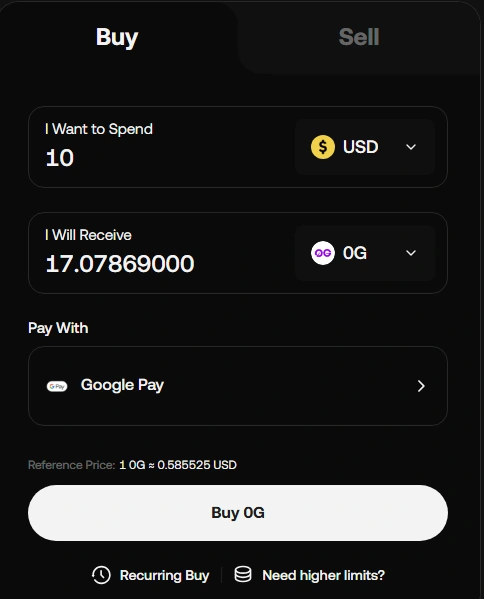
Good news here. KuCoin does not have a minimum deposit requirement for cryptocurrency transfers. You can deposit as little as you want ,technically even $10 worth of crypto and the platform will accept it.
However, there is a practical reality worth knowing. If you are depositing via a third-party fiat on-ramp like a credit card or bank transfer through KuCoin’s Fast Trade feature, some payment processors do set their own minimum transaction amounts, typically around $10 to $20 depending on your region.
For low budget users the cleanest approach is to buy crypto on a fiat-friendly platform first ,even something as simple as a local exchange that accepts bank transfers and then transfer it to KuCoin. This avoids third-party fees entirely
Trading Fees — The Number That Matters Most
KuCoin’s base trading fee is 0.1% for both makers and takers on spot trading. This is competitive it matches Binance and is significantly lower than Coinbase, which charges up to 0.6% at lower volumes.
On a $50 trade, 0.1% costs you $0.05. On a $100 trade, it is $0.10. These are genuinely small numbers and should not discourage anyone from using the platform.
Where it gets more interesting is KuCoin’s fee reduction system. If you hold any amount of KuCoin’s native token KCS, you get a 20% discount on trading fees, bringing your effective rate down to 0.08%. For a low budget user this is worth knowing because you do not need to hold a large amount of KCS to get the discount even a small holding qualifies.
One thing to watch is that KuCoin categorises assets into different classes. The standard 0.1% fee applies to Class A assets like Bitcoin and Ethereum. Lesser-known altcoins fall into Class B or Class C and can attract fees of 0.2% and 0.3% respectively. If you are trading smaller coins, your fees are higher than the headline number suggests.
Practical tip for low budget users: Stick to major pairs like BTC/USDT or ETH/USDT where the 0.1% fee applies and keep a small amount of KCS to unlock the 20% discount. These two simple steps keep your trading costs as low as possible.
Withdrawal Fees — The Hidden Cost Nobody Talks About Enough
This is where low budget users need to pay the most attention.
Withdrawal fees on KuCoin vary by asset and by the network you choose to withdraw on. And this is where small traders can get stung hard.
For example, withdrawing Bitcoin from KuCoin costs a network fee of around 0.0003 to 0.0005 BTC depending on network conditions. At current prices that can represent a meaningful percentage of a small portfolio.
The smarter move for low-budget users is to use cheaper networks whenever possible. Withdrawing USDT via the TRC-20 network (Tron) costs a fraction of what it would cost on the Ethereum network. A TRC-20 USDT withdrawal fee is typically around 1 USDT compared to several dollars on ERC-20.
Always and this cannot be stressed enough ,check the withdrawal fee before you confirm a transaction. KuCoin shows you the fee clearly before you finalise. Take five seconds to read it. On a small portfolio, withdrawal fees can represent 2% to 5% of your total transfer amount if you are not careful about which network you use.
Minimum Trade Size — Can You Actually Trade Small Amounts?
Yes and this is one of KuCoin’s genuine advantages for low budget users.
KuCoin allows very small minimum order sizes. On most major trading pairs you can place orders starting from just a few dollars worth of crypto. This is significantly more flexible than some competitors that set higher minimums.
This matters because it means you can trade meaningfully with a $50 or $100 account. You are not forced to commit your entire balance to a single trade just to meet a minimum order size.
The Trading Bot — A Genuine Advantage for Small Accounts
Here is something most low budget reviews miss entirely.
KuCoin’s trading bot is completely free to use. No subscription, no hidden cost. And for someone with a small account who cannot watch the market all day, this is actually one of the most valuable tools on the platform.
The Dollar-Cost Averaging (DCA) bot is particularly useful for low budget users. You set it to automatically buy a fixed dollar amount of an asset at regular intervals say $5 worth of Bitcoin every day or every week. The bot runs automatically in the background, which means you are building your portfolio steadily without needing to time the market or sit in front of a screen.
This strategy has historically performed well for long-term crypto holders and the fact that KuCoin offers it free is a genuine edge over some competitors that charge monthly fees for similar automation tools.
Staking With a Small Budget — Is It Worth It?
KuCoin offers staking options for a wide range of assets. The question for low budget users is whether the returns are meaningful when you are working with small amounts.
The honest answer is it depends on what you are staking and for how long.
For small amounts of major assets like Bitcoin or Ethereum, the staking returns are low percentage-wise and on a small portfolio the actual dollar return will be very modest. Staking $50 of Ethereum at 3% annually earns you $1.50 over a full year. Not life-changing.
Where staking becomes more interesting for low budget users is on stablecoins like USDT. KuCoin offers flexible staking on stablecoins with decent annual yields. Since stablecoin value does not fluctuate, this is essentially earning interest on your idle funds which is better than those funds sitting doing nothing.
The flexible option is important for small traders because it means you can withdraw your staked funds at any time without penalty. You are not locked in.
Is the Interface Friendly for Beginners?
This is a genuinely mixed answer.
KuCoin’s interface is feature-rich which is a polite way of saying it can feel overwhelming when you first log in. There are multiple trading views, dozens of features accessible from the main menu, and promotional banners competing for your attention.
That said, the basic spot trading interface is clean and functional once you know where it is. The charts are powered by TradingView which is the industry standard and familiar to anyone who has looked at a stock chart before. Placing a simple buy or sell order takes seconds once you have done it once.
The mobile app, rated 4.5 out of 5 on Google Play with over 10 million downloads, is actually more beginner-friendly than the desktop version. If you are a low budget user who just wants to buy, hold, and occasionally trade the mobile app is the better starting point.
Read more : OKX Review 2026: Honest Pros, Cons & Guide for Beginners
Security — What Protects Your Money
For a low budget user, security matters just as much as for a whale. Here is what KuCoin has in place:
Two-factor authentication is strongly encouraged and takes minutes to set up. Cold storage holds the majority of user funds offline. Proof of Reserves is published regularly to verify that user funds are held in full. KuCoin also holds SOC 2 Type II and ISO 27001 certifications for information security credentials that require independent auditing and are not easy to obtain.
The 2020 hack where $281 million was stolen from hot wallets is a fair concern. KuCoin recovered 84% of those funds and compensated affected users. The security improvements since then have been significant but it is a reminder that no centralised exchange is completely without risk.
The most important thing any low budget user can do is enable 2FA on day one and never keep funds on the exchange that you cannot afford to lose. For long-term holdings, a personal hardware wallet is always the safest option regardless of which exchange you use.
Customer Support — Be Prepared for Patience
KuCoin’s customer support is functional but slow. The first response you get is almost always from an automated bot. Escalating to a human agent typically takes several hours and during busy periods can take longer.
For low budget users with straightforward questions how to deposit, how to set up a bot, how to find a trading pair the help documentation is actually comprehensive and answers most common questions without needing to contact support at all.
Where slow support becomes a real problem is if something goes wrong with a transaction or withdrawal. In those situations the wait time can be stressful. This is an area where KuCoin genuinely lags behind better-regulated exchanges like Coinbase or Kraken.
Is KuCoin Worth It for Low-Budget Users — The Honest Verdict
After looking at this exchange specifically through the lens of someone working with limited funds, here is the bottom line.
KuCoin is worth using for low-budget users who are willing to spend a little time learning the platform. The minimum trade sizes are accessible, the base trading fees are competitive, the DCA bot is free and genuinely useful, and flexible staking gives your idle funds something to do.
The things to watch out for are withdrawal fees always check them before confirming and the Class B and C asset fees that can catch small traders off guard on lesser-known coins. The lack of FCA or SEC regulation is a real consideration and means your funds have less legal protection than on a regulated platform.
If you are starting with $50 to $200 and your plan is to buy established assets like Bitcoin or Ethereum, run a small DCA bot, and stake your idle stablecoins — KuCoin gives you the tools to do all of that without your fees eating your portfolio alive.
If you are a complete beginner who wants hand-holding and fast customer support above all else, Coinbase or Kraken might be a more comfortable starting point, even if the fees are slightly higher.
Faqs
Is KuCoin good for beginners with no experience?
KuCoin can work for beginners but it is not the simplest exchange to start on. The interface has a lot going on and can feel overwhelming at first. The mobile app is more beginner-friendly than the desktop version. If you are completely new to crypto, spend 30 minutes exploring the platform before depositing any money.
Can I use KuCoin with just $10?
Technically yes — KuCoin has no minimum deposit requirement for crypto transfers. However realistically $10 leaves very little room after withdrawal and trading fees. Starting with at least $50 gives you enough to trade meaningfully without fees eating the majority of your balance.
Do I need to complete KYC verification on KuCoin?
Yes. KuCoin now requires KYC verification for full platform access. You will need to upload a government-issued ID and take a selfie. Verification typically completes within 15 to 30 minutes. KYC became mandatory after KuCoin’s 2023 DOJ settlement over anti-money laundering compliance failures.
Are there any hidden fees on KuCoin?
KuCoin is fairly transparent about its fees. There are no hidden deposit fees for crypto transfers. The things that catch small traders off guard are the higher fees on Class B and C altcoins, withdrawal network fees if you choose the wrong network, and third-party fiat payment processor charges when buying crypto directly with a card. Always read the fee breakdown before confirming any transaction.
Is KuCoin staking worth it for small amounts?
For small amounts of volatile assets like Bitcoin or Ethereum the returns are modest in real dollar terms. Staking $50 of Ethereum at 3% annually earns roughly $1.50 over a full year. Where staking makes more sense for low budget users is on stablecoins like USDT through the flexible staking option — since the value does not fluctuate you are essentially earning interest on idle funds with no added risk.
Is the KuCoin mobile app good for beginners?
The KuCoin mobile app is rated 4.5 out of 5 on Google Play with over 10 million downloads and is actually more beginner-friendly than the desktop version. It gives you access to all the core features — spot trading, bots, staking, and withdrawals — in a cleaner layout. If you are a low budget user who just wants to buy, hold, and occasionally trade, the mobile app is the better place to start.
Quick Summary — KuCoin for Low Budget Users
Works well for small accounts:
- No minimum deposit requirement
- Minimum trade sizes starting from a few dollars
- Competitive 0.1% spot trading fees
- Free DCA trading bot built into the platform
- Flexible staking on stablecoins
- Strong mobile app experience
Watch out for:
- Withdrawal fees — always choose the cheapest network
- Higher fees on Class B and C altcoins
- Slow customer support response times
- No FCA or SEC regulation — limited legal protection
- Cluttered interface that takes time to learn
