
Coinbase
Overall rating — beginner review
Coinbase Review for Beginners
If you've been thinking about buying your first Bitcoin or dipping your toes into the crypto world, chances are someone has already pointed you toward Coinbase. And honestly, that's not bad advice, but it's not the full picture either.
I tested Coinbase hands-on to give you a fair, complete view of the platform. This review covers everything a beginner actually needs to know: the fees (the part most reviews gloss over), the safety setup, the features, and the honest answer to whether Coinbase is still the right starting point in 2026.
Scoring Methodology
Before jumping in, here's how this review was evaluated. Each category reflects what matters most to a beginner user.
| Category | Weight | Score (out of 10) |
| Ease of Use / UX | 25% | 9.2 |
| Security | 20% | 9.0 |
| Fees & Transparency | 20% | 6.5 |
| Supported Assets | 15% | 7.5 |
| Deposit & Withdrawal | 10% | 8.0 |
| Customer Support | 5% | 6.0 |
| Regulatory Compliance | 5% | 9.5 |
| Overall Score | 100% | 8.1 / 10 |
Scoring based on hands-on testing, publicly available fee disclosures, and regulatory filings.
What Is Coinbase?
Coinbase is a US-based cryptocurrency exchange founded in 2012. Over the past decade, it has grown into one of the most recognised crypto platforms in the world, and it is publicly traded on the NASDAQ under the ticker symbol COIN.
With over 100 million verified users globally, Coinbase offers trading in a wide range of digital assets and holds a BitLicense in New York, along with Money Services Business (MSB) registration across most US states.
Coinbase is a centralized exchange (CEX) that was established in 2012 and has built a reputation as one of the most compliant and regulation-oriented crypto platforms over the years. That compliance-first approach is exactly why millions of beginners start here , it feels closer to a bank than to the Wild West of crypto.
Beyond simple trading, Coinbase has evolved into a broader ecosystem. The platform now stretches from beginner trading tools to on chain apps, payments, staking, and developer infrastructure. It also provides custodial services for a large portion of US Spot Bitcoin and Ethereum ETFs, which speaks to the institutional trust it has built.
Is Coinbase Good for Beginners?
Short answer: yes, for the onboarding phase. Longer answer: it depends on how you plan to use it.
Coinbase is one of the best crypto exchanges for beginners because of its simple interface, strong security features, and regulated status. New users can buy crypto easily through the standard platform, then move to Advanced Trade as they gain experience.
When I tested the signup and first-purchase flow, the experience was genuinely smooth. There are no confusing dashboards to navigate, no overwhelming charts thrown at you on day one. The app essentially holds your hand through the entire process, and that is a real feature, not a gimmick.
That said, convenience has a cost. The standard Coinbase interface charges noticeably higher fees than competitors, and if you never discover the Advanced Trade toggle, you could pay more than necessary for years. More on this in the fees section below.
For most users, Coinbase is best as a safe, easy fiat-to-crypto gateway rather than the lowest-fee platform for high-volume trading. That is the honest framing. If you are a beginner buying Bitcoin or Ethereum once a month, Coinbase makes the process painless. If you plan to trade actively, you will want to look at the fee structure carefully.
How to Create a Coinbase Account
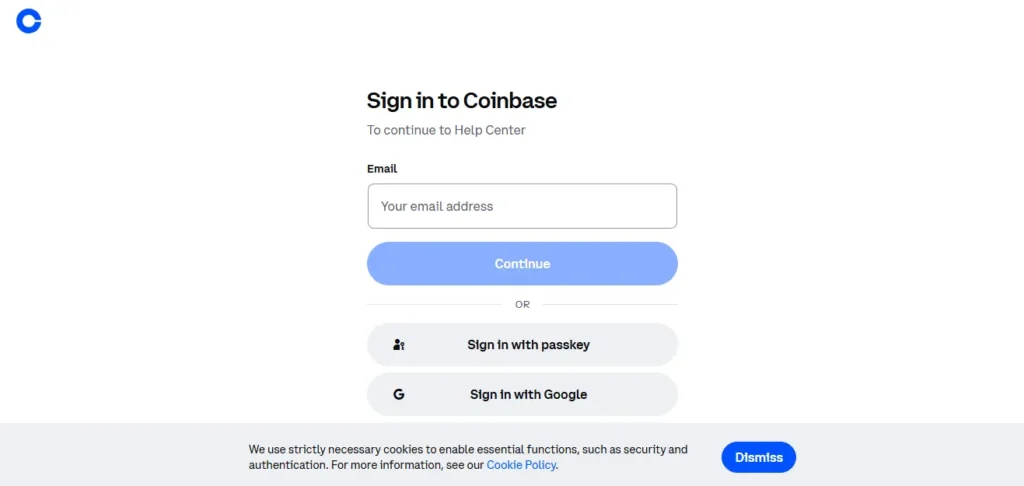
Opening a Coinbase account is straightforward and fully online, with most users able to complete registration in 10 to 15 minutes.
Here is the step-by-step process:
Step 1 — Visit the Platform Go to coinbase.com or download the Coinbase app on iOS or Android.
Step 2 — Sign Up Enter your email address and create a strong password. You will receive a verification email; click the link to confirm your address.
Step 3 — Complete Identity Verification (KYC) Coinbase is a regulated platform, so identity verification is required. You will need to upload a government-issued photo ID (passport or driver's licence). Identity verification often completes within a few minutes, but in some cases it can take up to 48 hours depending on document quality and processing volume.
Step 4 — Add a Payment Method Connect a bank account, debit card, or other supported payment method. Bank transfers (ACH in the US) are free and the most cost-effective option.
Step 5 — Enable Two-Factor Authentication (2FA). Do this before you do anything else. Seriously. The two minutes spent here protect everything.
Step 6 — Start Trading or Switch to Advanced Trade You can buy crypto immediately from the simple interface, or toggle to Advanced Trade for lower fees. The toggle is free and takes one click — there is no separate account needed.
One thing worth knowing: Coinbase does not offer a demo account. The lack of a demo account means new users must commit real funds before placing their first trade. The workaround? Start with the minimum; you can trade with as little as $1.
Coinbase Trading Features Explained
Coinbase keeps its product suite cleaner than most exchanges. Here is what you actually get.
Simple Trade (Standard Interface)
This is what most beginners land on. It is built for speed and ease. You pick a crypto, enter an amount, and buy. No charts, no order books, no complexity. The trade-off is that this interface carries a price spread on every transaction. Transactions executed through the standard interface involve two primary cost components: a price spread (frequently between 0.50% and 1.00%) and a flat transaction fee based on the total order size.
Advanced Trade
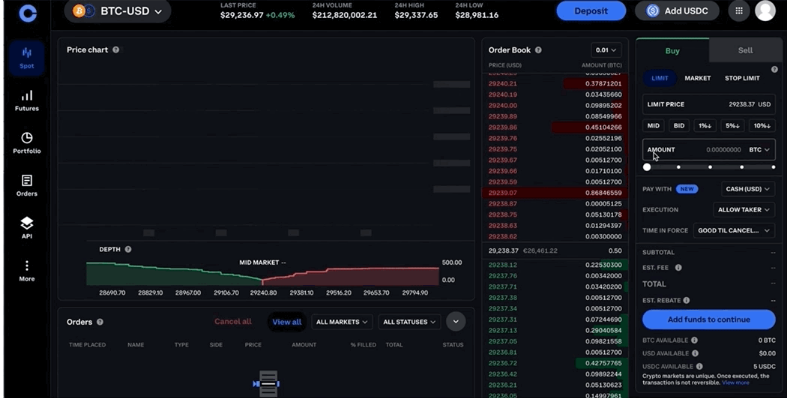
Coinbase Advanced adds an order book, deeper charting, and more control over execution, including market orders for instant execution, limit orders for price control, and stop-limit orders for risk management. This makes Coinbase usable for both first-time buyers and more active traders , you do not need to open a new account to access these tools.
During my testing, switching between Simple and Advanced Trade was seamless. The interface difference is significant though , Advanced Trade looks like a proper trading platform, not a shopping cart for crypto.
Staking
Users can stake supported assets directly on the platform and earn rewards without running validator infrastructure. Supported assets may include Ethereum, Solana, and Cosmos, among others, with staking availability varying by region.
Staking rewards range from 3% to 6% APY and are automatically credited daily or weekly to your account. You do not need to actively manage your staked assets, and you can unstake at any time, though some assets may have unstaking periods.
Coinbase Earn
The Coinbase Earn program offers a way to earn small amounts of crypto by completing short educational modules about specific projects. It is not a major income source, but it can be a simple way for beginners to explore different assets.
Coinbase One (Subscription Tier)
Coinbase One is a paid subscription tier that removes trading fees on eligible transactions, provides up to $1 million in account protection, and includes priority customer support. Coinbase One Basic users do not have to pay trading fees on $500 worth of trades per month, while Preferred users get zero trading fees on up to $10,000 in trades per month. For frequent traders, the maths can work in your favour.
Portfolio Tracking
Coinbase includes custom watchlists to follow selected assets, price alerts for market movements, and clear portfolio views showing asset allocation, gains and losses, and transaction history. These tools are solid for everyday decision-making without being overwhelming.
Coinbase Fees for Beginners
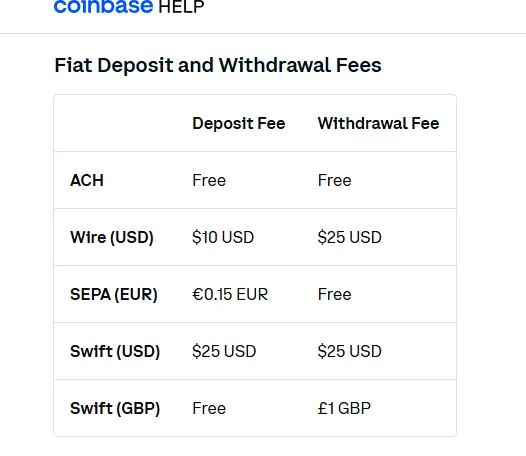
This is the section most Coinbase marketing would rather you skip. Let's not do that.
Coinbase's fee structure is a confusing combination of elements that depend on three factors: the payment method, the order size, and market conditions such as volatility and liquidity.
Standard Interface Fees:
- For a $100 transaction, the flat fee is approximately $2.99
- A price spread of around 0.5% to 1.0% is embedded in the quoted price
Advanced Trade Fees (Maker/Taker model):
- Taker fee: 0.60% on Advanced Trade, which can drop to 0.05% with higher 30-day trading volume. Maker fee: ranges from 0.40% to 0.00%, with 0.00% available for high-volume traders.
The Spread Problem:
A critical consideration is the spread: when you buy or sell on the mobile app, spreads are more pronounced, sometimes resulting in 1% to 3% price markups on purchases. This means a $1,000 Bitcoin purchase might cost you $1,020 to $1,030 in actual value due to spreads.
In practice, this is the cost beginners are least aware of. The spread is not listed as a separate line item , it is baked into the quoted price. Always compare the price Coinbase shows you against the real market price before confirming a trade.
The good news: switching to Advanced Trade eliminates the spread and applies a much lower maker/taker model. On the standard Coinbase interface via debit card, a purchase could have cost up to several pounds or dollars more in fees than the same purchase made through the Advanced Trade interface. Switching to Advanced before your first buy is the single most useful tip for any new Coinbase user.
Deposit & Withdrawal Methods
Coinbase offers a flexible and beginner-friendly funding setup, with free bank transfers and fast access to crypto.
Deposit Options:
| Method | Speed | Fee |
| ACH Bank Transfer (US) | 3–5 business days | Free |
| Debit Card | Instant | ~2.49% |
| Wire Transfer | 1–3 days | Variable |
| PayPal (select regions) | Instant | Variable |
Withdrawal Options:
- Bank transfer back to your linked account is free for standard withdrawals
- Crypto withdrawals carry network fees (paid to the blockchain, not Coinbase)
One standout feature: Coinbase is one of the few crypto exchanges to allow users to withdraw crypto immediately after they purchase it using fiat currency, rather than waiting several days for the payment transaction to clear. That is genuinely useful and not something every exchange offers.
Coinbase supports more than 60 fiat currencies via bank transfers, credit/debit cards, and instant buy/sell options.
Pros and Cons
Pros
- Beginner-friendly interface — one of the cleanest onboarding experiences in crypto
- Strong regulatory compliance — publicly traded, US-licensed, FDIC-insured USD balances
- Robust security — 98% of assets in cold storage, 2FA, passkeys, biometric login
- Advanced Trade available for free — lower fees without needing a new account
- Quick crypto withdrawals — immediate access to purchased crypto
- Educational tools — Coinbase Earn and learning modules for new users
- Staking available — earn passive rewards on supported assets
Cons
- High fees on the standard interface — beginners who don't discover Advanced Trade overpay
- Fee transparency has gotten worse — spreads are not clearly shown as separate charges
- Limited altcoin selection — around 275+ coins vs 500+ on Binance
- Customer support relies on chatbots — reaching a human can be difficult
- Some features are restricted by state or country — availability varies significantly
Coinbase Supported Cryptocurrencies
Coinbase supports more than 275 cryptocurrencies, including major assets like Bitcoin, Ethereum, Solana, XRP, Cardano, and Dogecoin. Its selection is smaller than some offshore exchanges, but Coinbase applies a stricter review process before listing assets, focusing more on compliance and security than offering the largest possible number of tokens.
The listing philosophy here matters. Coinbase uses an internal review process that evaluates compliance, security, and project quality before adding an asset. This means you will not find as many obscure altcoins as on platforms like Binance (which supports 500+ assets) or KuCoin (which lists 1,200+), but the assets you do find have gone through a meaningful quality check.
For a beginner, 275+ coins is more than enough. You are not going to run out of things to explore — and frankly, for your first months in crypto, sticking to the major assets is the smarter move anyway.
Common Beginner Mistakes on Coinbase
These are the patterns I see trip up new users most often.
1. Using the Standard Interface and Paying Full Spread. The biggest one, by far. Toggle to Advanced Trade before you make your first purchase. The fee savings on even modest trades are immediate and real.
2. Not Enabling 2FA Coinbase is secure, but your account security is your responsibility too. Enable two-factor authentication during setup, not after something goes wrong.
3. Ignoring the Network Fees on Withdrawals When you send crypto to an external wallet, you pay a network fee. These can fluctuate — sometimes dramatically on busy networks like Ethereum. Always check the fee before confirming a withdrawal.
4. Treating the Coinbase Wallet as Long-Term Storage. Coinbase holds your crypto in its custody, meaning they control the private keys. For long-term holdings, experienced users move crypto to hardware wallets like Ledger or Trezor. For beginners just starting out, the Coinbase wallet is fine — just understand the trade-off.
5. Confusing "Coinbase" and "Coinbase Wallet" These are two separate products. Coinbase is the exchange (custodial). Coinbase Wallet is a self-custody app where you control your own keys. They sound similar but function differently.
6. FOMO Buying During Price Spikes This is a crypto problem, not a Coinbase problem, but Coinbase makes buying so easy that it can accelerate impulsive decisions. Set price alerts. Build a plan. Boring but effective.
Is Coinbase Safe for Beginners?
In 2026, Coinbase remains a safe and reliable crypto exchange for beginners and casual investors. Its strong regulation, high security standards, and easy-to-use platform make it a popular choice worldwide.
Here is what the security stack actually looks like:
Cold Storage: 98% of user digital assets are maintained in geographically decentralised cold storage (offline) environments. The remaining 2% in hot wallets is insured.
Account Protections: Coinbase offers strong account protections, including passkeys, security keys, two-step verification, and withdrawal protections. Biometric login is supported on mobile.
Regulatory Status: Coinbase is publicly traded on NASDAQ (ticker: COIN), which subjects it to SEC reporting requirements and financial transparency obligations. This is a meaningful layer of accountability that most exchanges do not have.
Institutional Credibility: The platform currently provides custodial services for approximately 80% of US Spot Bitcoin and Ethereum ETFs, with total assets under custody exceeding $240 billion. When the largest financial institutions in the world trust Coinbase with their ETF holdings, that says something.
One honest caveat: Individual account security still depends heavily on the user enabling protections like 2FA. Coinbase cannot protect you from a weak password or reusing credentials across sites. The platform gives you the tools , you have to use them.
Customer Support
This is arguably Coinbase's weakest area, and I found that out firsthand.
In theory, Coinbase offers 24-hour support via chat, phone, and email. But in practice, Coinbase tends to route customer service inquiries to automated chatbots, and makes it difficult to contact an actual person for support, especially if you are not logged in.
The support model has undergone several revisions to address historical user feedback regarding response times. All users have access to live chat, which utilises an initial AI-driven triage system. Direct phone support is reserved for Coinbase One subscribers.
My experience was that the chatbot handles simple, common questions reasonably well , things like "how do I add a payment method" or "how do I enable 2FA." For anything more specific or account-sensitive, the process of escalating to a human is slower and less intuitive than it should be.
If customer support quality is a top priority for you, Kraken is consistently rated better in this area for similar user profiles.
Support channels available:
- Live chat (AI-assisted, with human escalation)
- Email support
- Help centre and FAQ documentation
- Phone support (Coinbase One subscribers only)
Coinbase Alternatives
Coinbase is a great starting point, but it is not the only option. Here is how the main alternatives compare for different user needs.
Kraken — Best for Security + Lower Fees
Kraken has the strongest operational security history with no major hack since inception in 2011. Its Proof of Reserves is regarded as the gold standard, and security experts often recommend it for high-net-worth individuals.
Kraken is totally better for beginners who plan to become active traders, mainly because their Pro platform has lower fees and better features. Coinbase has a slightly simpler initial interface, but Kraken offers comparable ease of use plus a much better fee structure over time.
Binance / Binance.US — Best for Low Fees and Altcoin Range
Binance is the world's largest cryptocurrency exchange by trading volume, with approximately $15 to $25 billion in daily spot trading volume and over 200 million registered users worldwide.
The trade-off: Binance's interface is considerably more complex than Coinbase's. For a complete beginner, it can feel like being handed a Boeing cockpit when you just want to drive to the supermarket. The fees are meaningfully lower, though, and the altcoin selection is much wider.
Gemini — Best US-Based Alternative for Compliance Focus
Gemini is another US-regulated exchange with a strong compliance record. It is slightly simpler than Kraken and similarly focused on security. Fees sit between Coinbase's standard interface and Advanced Trade pricing.
Quick Comparison Table:
| Feature | Coinbase | Kraken | Binance |
| Beginner UX | ⭐⭐⭐⭐⭐ | ⭐⭐⭐⭐ | ⭐⭐⭐ |
| Fees (Standard) | Higher | Mid-range | Low |
| Coins Supported | ~275+ | 200+ | 500+ |
| US Availability | All 50 states | Most states | Binance.US only |
| Security Record | Strong | Excellent | Good |
| Customer Support | Average | Good | Average |
Final Verdict
Coinbase in 2026 is best described as the right exchange to start on, but not necessarily the only one you will ever need.
Coinbase remains one of the strongest choices for users who prioritise security, regulation, and ease of use. It is particularly attractive for beginners and long-term investors who want a straightforward way to buy, sell, store, and earn rewards on digital assets.
The main drawback is cost. Coinbase is rarely the cheapest option unless you use Advanced Trade or structure purchases carefully. The standard interface fees are genuinely high by industry standards, and the spread transparency issue has gotten worse over time, not better.
My overall take: start with Coinbase if you are new to crypto. The regulated environment, clean UX, and institutional credibility make it a sensible first platform. Immediately learn to use Advanced Trade; that one step will save you meaningful money. And as your knowledge grows, explore platforms like Kraken or Binance alongside Coinbase rather than as a replacement.
Crypto is a long game. Starting on solid ground matters more than starting on the cheapest ground.
Who should use Coinbase:
- First-time crypto buyers in the US
- Long-term investors who value security over low fees
- Anyone who wants a regulated, publicly accountable platform
- Users who value simplicity and a clean mobile experience
Who should consider alternatives:
- Active traders focused on keeping fees as low as possible
- Users who want access to a wider range of altcoins
- Anyone who needs advanced derivatives or leverage trading
Disclaimer
This article is for informational and educational purposes only. It does not constitute financial advice or a recommendation to buy, sell, or hold any cryptocurrency. Cryptocurrency investments carry significant risk, including the possible loss of all invested capital. Always conduct your own research and consider consulting a qualified financial adviser before making investment decisions. Fee structures, features, and regulatory status are subject to change; always verify current information directly on the Coinbase platform.
Sources referenced in this review include publicly available information from Coinbase, NerdWallet, Coin Bureau, Invezz, CoinGape, and TradingCritique. All data reflects information available as of mid-2026.
