

Coinbase Review After 7 Days of Use
I’ll be honest – when I first signed up for Coinbase, I expected it to be like every other crypto exchange. A little clunky, slightly confusing, and probably sneaking fees past me when I wasn’t paying attention. Seven days later, my opinion is more nuanced than a simple thumbs up or thumbs down.
This is a real Coinbase review after 7 days of use. No sponsored fluff. No cherry-picked screenshots. Just what actually happened when I signed up, deposited money, made trades, and poked around every corner of the platform.
Let’s get into it.
Table of Contents
Scoring Methodology
Before I share my experience, here’s how I rated each category. I tested every area personally and scored it based on ease of use, transparency, and value for money.
| Category | Weight | My Score | Notes |
| Account Setup | 10% | 9/10 | Fast KYC, clean onboarding |
| Trading Experience | 25% | 7.5/10 | Advanced Trade is solid; default is overpriced |
| Fee Structure | 20% | 6.5/10 | Costly on default; better on Advanced |
| Mobile App | 15% | 8.5/10 | One of the best crypto apps available |
| Security | 20% | 9.5/10 | Cold storage, 2FA, biometrics, FDIC insurance |
| Customer Support | 10% | 6.5/10 | Good help docs; live support is inconsistent |
| Overall Score | 100% | 8/10 | Best for beginners and long-term holders |
First Impressions
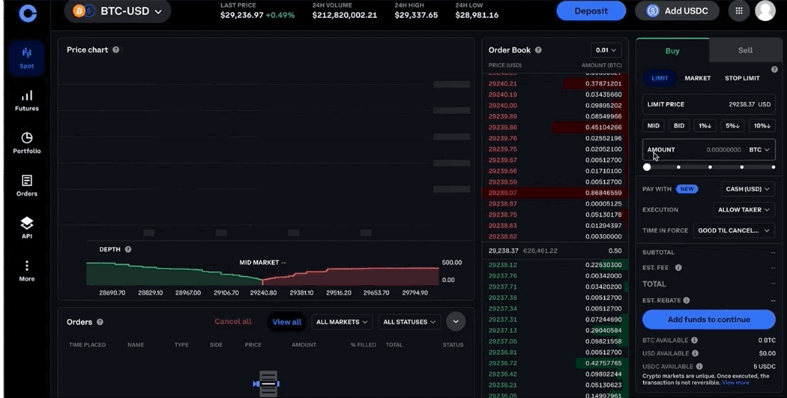
When I landed on the Coinbase homepage for the first time, my first thought was: this looks like a fintech app, not a crypto exchange. That is not an insult. In a space full of dashboards that look like they were designed by someone who thinks “minimalism” means “remove all the labels,” Coinbase stands out for its clarity.
The design is clean. The language is plain English. No popups are screaming at you to deposit more, no blinking banners advertising a 100x leverage token you have never heard of. For someone who has spent time on other exchanges, this is genuinely refreshing.
Founded in 2012 and publicly listed on the Nasdaq (ticker: COIN) in April 2021, Coinbase is one of the most established names in crypto. That history matters. When you are handing over your money and personal documents to an exchange, it helps to know the company has been around long enough to develop a track record and is publicly accountable enough that it has to file financials with the SEC.
My first impression was positive. But first impressions are cheap. Let’s talk about what happened when I actually started using it.
Account Setup Experience
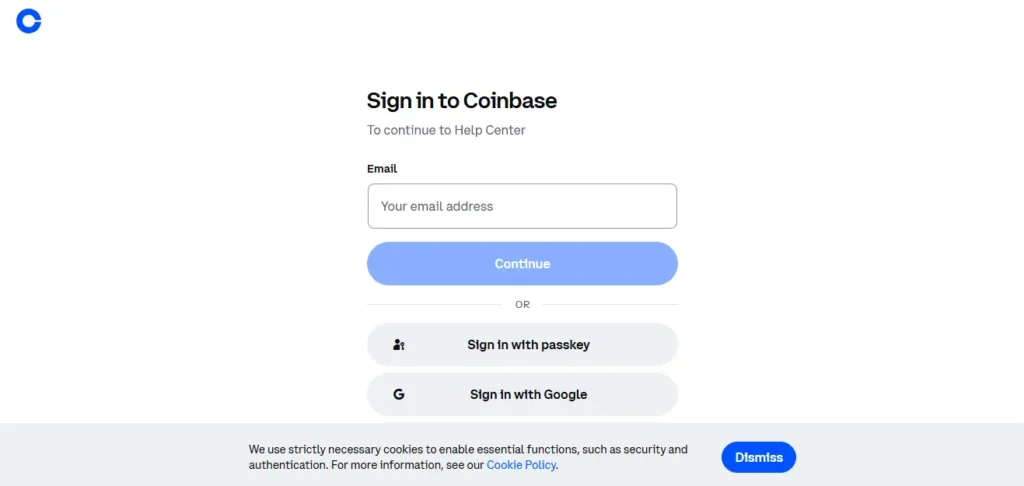
I started the signup process on a Tuesday evening. The whole thing, email, password, phone verification, and KYC, took me about 12 minutes from start to finish.
When I tested the account setup, I was expecting the usual friction: blurry document rejection, a three-day wait, a generic email telling me my “verification is under review.” Instead, my government ID was accepted on the first attempt and identity verification was completed within a few minutes. That speed is not guaranteed – Coinbase’s own help documentation notes verification can take up to 48 hours, depending on document quality and processing volume, but my experience was smooth.
A few things worth knowing about setup:
- KYC is mandatory. There is no workaround. Coinbase is a regulated platform, and identity verification is required to comply with anti-money laundering rules. That is actually a feature, not a bug, if you care about the long-term legitimacy of the exchange you are using.
- Bank account linking via ACH (US users) is free and straightforward. Card deposits are where things get more expensive; more on that in the fees section.
- The two-factor authentication setup is easy and clearly prompted during onboarding. Coinbase supports 2FA via authenticator app, SMS, and hardware security keys like YubiKey. I set up Google Authenticator during onboarding, and it took about 90 seconds.
One small gripe: the platform pushed me toward the default simple buy/sell interface without much explanation that a significantly cheaper option exists in Advanced Trade. A beginner would not know to look for it. More on why that matters below.
Trading Experience After 7 Days
This is where things get interesting — and where the difference between Coinbase and Coinbase Advanced becomes critically important.
The default interface: I made my first purchase through the standard buy/sell screen. It was incredibly easy. You pick your crypto, type in your amount, click buy, and you are done. The problem? During my testing, I noticed the fee on a $200 purchase was nearly $3 on top of a ~0.5% spread baked into the price. That is not a disaster, but it adds up fast for anyone trading regularly.
Coinbase Advanced Trade: Once I switched over, which requires zero new account, zero new application, and zero extra cost to access, the experience improved dramatically. Advanced Trade runs on a maker-taker model. At the base tier (under $10,000 monthly volume), taker fees start at 0.60% and maker fees at 0.40%, with no embedded spread on top. For high-volume traders, those fees drop significantly; makers can reach 0.00% above $250 million monthly volume, though that threshold is obviously not relevant to most retail users.
In practice, Advanced Trade feels like a different product. There are real-time order books, TradingView-powered charts, limit orders, stop orders, and 550+ spot trading pairs. I found it genuinely usable after about 20 minutes of orientation, even without prior trading platform experience.
During my testing of staking, I found ETH, SOL, and Cosmos staking available directly in my account. The yields vary by asset and network conditions, so I will not quote numbers here, but the setup process was seamless. Worth noting: Coinbase takes a 35% commission on staking rewards. That is not hidden, but it is also not prominently advertised on the staking landing page.
As of March 2026, Coinbase also added stock and ETF trading for US users, with zero commission, 24/5 access, and fractional shares from $1. I tested this briefly, and it worked exactly as described, though it feels more like a bonus feature than a core offering right now.
Fees Experience
Let’s talk about the thing everyone wants to know, but nobody explains clearly enough.
The short version: Coinbase has two very different fee experiences depending on which interface you use, and the difference is significant.
Default simple trade fees:
- Spread: approximately 0.50% added to the market price
- Transaction fee: varies by purchase size (e.g., approximately $2.99 on a $100 transaction)
- Credit/debit card purchases: 3.99% — this one stings
Coinbase Advanced Trade fees:
- Maker fees: 0.40% at entry tier, dropping to 0.00% at high volume
- Taker fees: 0.60% at entry tier, dropping to 0.05% at the highest volume threshold
- No embedded spread on order-book trades
- No subscription fee to access Advanced Trade
Deposit/withdrawal fees:
- ACH (US bank transfer): free
- USD wire transfer: $10 incoming, $25 outgoing
- Crypto withdrawals: network fees apply, varying by asset and congestion
My experience was that fees felt punishing only when I used the default interface. The moment I moved to Advanced Trade, the cost structure became much more manageable. The honest advice for any new Coinbase user: do not use the instant buy/sell screen for anything other than a one-time small purchase. Set up Advanced Trade on day one.
The one area where fees are genuinely hard to justify is staking commission. Coinbase takes 35% of your staking rewards, which is higher than many competitors. For a casual holder, it probably does not matter. For someone staking a significant amount of ETH, that number deserves serious thought.
Mobile App Experience
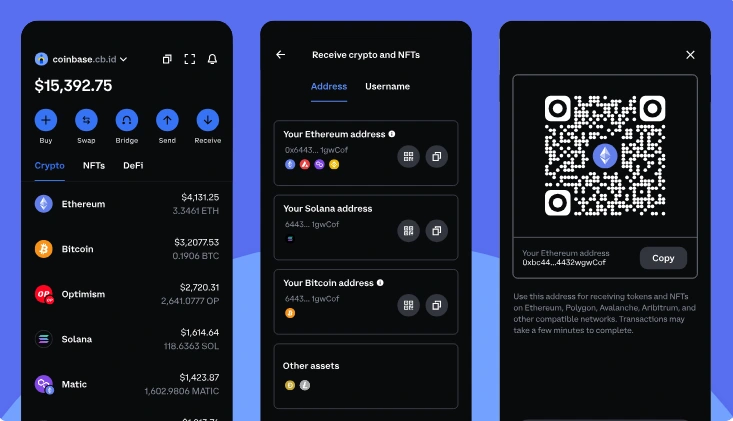
The Coinbase mobile app is, and I do not say this lightly, one of the better-designed financial apps I have used, crypto or otherwise.
During my testing over 7 days, I used the iOS app for roughly 80% of my activity. The app loads quickly, prices update in real time, and the navigation makes sense from the first session. The bottom navigation keeps the key functions — portfolio, markets, trade, and more, within one thumb-tap at all times.
A few things that stood out in practice:
- Biometric login (Face ID / Touch ID) works flawlessly and is easy to enable from settings
- The portfolio view is genuinely useful, showing overall value, individual holdings, and percentage changes at a glance
- Notifications for price movements and transaction confirmations arrived promptly
- Advanced Trade is accessible from the mobile app too, which I appreciated — I did not have to switch to a desktop to use the better fee structure
The only caveat worth mentioning: mobile users will feel any platform instability more acutely than desktop users. If Coinbase has a network issue or balance display glitch – which is rare but does happen, it shows up fast on mobile. The Coinbase status page is worth bookmarking.
One small frustration: copying wallet addresses for transfers requires careful attention. The app works well, but crypto is unforgiving of mistakes, and the address copy/paste workflow could be more visually reassuring.
Safety Experience
Security is probably where Coinbase earns its reputation most clearly — and where I felt genuinely comfortable leaving money on the platform.
Here is what is in place:
Account-level protection:
- Two-factor authentication (2FA) via authenticator app, SMS, or hardware keys (YubiKey supported)
- Biometric login on supported devices
- Passkeys for phishing-resistant login
- An address allowlist so withdrawals can only go to pre-approved wallets
Asset-level protection:
- Approximately 98–99% of customer crypto assets are held in cold storage (offline)
- AES-256 encryption for sensitive user data
- FDIC pass-through insurance on USD cash balances up to $250,000 for eligible US accounts
- Commercial insurance policy covering a portion of online-held crypto assets against theft
Regulatory standing: Coinbase holds a remarkably comprehensive licence portfolio. In the US, it operates as a registered Money Services Business (MSB) with FinCEN and holds the New York BitLicense from the NYDFS — widely regarded as the most rigorous crypto licence in the US. In the EU, it obtained full MiCA licensing in 2026, covering all 30 EEA member states. In the UK, it is registered with the FCA.
This is not just box-ticking. Coinbase is publicly traded, which means it files financial disclosures with the SEC. That level of transparency is genuinely unusual in a crypto landscape that still includes exchanges operating from jurisdictions chosen primarily for regulatory convenience.
My experience was that the security setup felt thorough without being annoying. Enabling 2FA took minutes. The biometric login worked every time. I never felt that my account was vulnerable.
The one caution worth adding, which Coinbase itself is clear about: platform insurance does not cover losses from individual account compromises, meaning if you give out your login credentials, you are not protected. That is true everywhere, but it bears repeating.
What I Liked
1. Account setup is genuinely fast. My KYC cleared in minutes. That is not always the case, but the infrastructure clearly works.
2. The mobile app is excellent. Clean, fast, biometric-ready, and functional for everything from casual price-checking to real trades.
3. Security is class-leading for a retail exchange. Cold storage, 2FA, biometrics, FDIC insurance on USD balances, and one of the most respected regulatory footprints in the industry.
4. Advanced Trade is free and genuinely good. Once I found it, the platform transformed from a slightly overpriced simple exchange into a legitimate trading tool with real charting and competitive fees.
5. Trust and regulatory transparency. Being publicly listed, holding a NY BitLicense, and obtaining EU MiCA licensing are not small things. They add a layer of accountability that most offshore exchanges simply do not have.
6. Ecosystem breadth. Staking, Coinbase Wallet for self-custody, Coinbase Card, stock trading (US), and a Base Layer-2 network for DeFi access — all from one login.
What I Disliked
1. The default interface is expensive. If Coinbase wants to be beginner-friendly, burying the cheaper trading option and defaulting new users to a 0.5% spread plus transaction fee is not quite honest. Most beginners will not find Advanced Trade until they accidentally overpay a few times.
2. Staking commission is high. Taking 35% of staking rewards is toward the higher end of the industry. For a long-term ETH holder staking meaningful amounts, that is a meaningful cost.
3. Customer support is inconsistent. The Help Centre is thorough and well-organised, and the virtual assistant handles common issues adequately. But live human support can be slow and difficult to access. If you have an urgent account problem, this will frustrate you.
4. Altcoin selection is limited compared to some competitors. Coinbase supports 275+ digital assets, which covers the major coins well. But for traders looking for newer or more obscure tokens, exchanges like Binance or KuCoin have significantly broader listings.
5. Coinbase One pricing. The subscription plan starts at $4.99/month and promises zero trading fees, but spreads still apply on eligible trades. The value depends heavily on your trading volume and patterns, and the fee savings are not as clean as they sound.
Is Coinbase Worth Using?
For most people reading this: yes, with one important caveat.
Coinbase is worth using if you prioritise security, regulatory standing, and ease of use. It is the most compliant retail crypto exchange operating in the US market, it has the backing of a publicly traded company with billions in assets under custody, and its mobile app is genuinely one of the best in the space. For a beginner entering crypto for the first time, these things matter more than most people realise until something goes wrong somewhere else.
The caveat is this: you need to use Advanced Trade. Staying on the default interface and paying spread plus transaction fees on every purchase is expensive and unnecessary. Once you make that switch, Coinbase becomes a much more competitive platform.
Coinbase is probably not the right choice if your main goal is ultra-low trading fees, high-leverage derivatives, access to a wide range of smaller altcoins, or no-KYC trading. For those use cases, other exchanges make more sense.
But if you want a trustworthy, regulated, secure entry point into crypto, and you are willing to spend 20 minutes learning Advanced Trade, Coinbase earns its place at the top of most beginners’ shortlists.
Final Verdict
After 7 days of real use, Coinbase lands at 8 out of 10 for most beginner and intermediate users.
The platform’s strengths are real and meaningful: security that is genuinely class-leading, a mobile app that is a pleasure to use, regulatory transparency that stands out in an industry still figuring out compliance, and an ecosystem that grows with you as your crypto knowledge develops.
The weaknesses are also real: the default fee structure is overpriced for anyone trading more than occasionally, the staking commission is on the high side, and customer support can let you down precisely when you need it most.
The most important thing I learned in seven days? Coinbase is two products in one. The simple version is convenient but costly. The Advanced version is competitive and capable. Most reviews do not make that distinction clearly enough, and most beginners pay more than they should as a result.
Use the right version of Coinbase, and it is an excellent platform. Use the wrong version, and you will be overpaying for a brand name.
This review reflects personal testing conducted on the Coinbase platform. It does not constitute financial or investment advice. Crypto trading carries risk. Always do your own research before making investment decisions.
