
If you’ve ever bought crypto on Coinbase and thought, “wait, how much did I just pay?” you’re not alone. Coinbase is one of the most trusted and regulated crypto exchanges in the world, but its fee structure can feel like a Russian nesting doll. Just when you think you’ve found the last layer, another charge appears. This Coinbase fees review breaks down every cost, every trick, and every workaround so you can trade smarter, not just harder.
Let’s get into it.
Scoring Methodology
Before diving deep, here’s how this review scores Coinbase’s fee structure across key categories. Scores are based on hands-on testing, public fee disclosures, and comparison against industry benchmarks.
| Category | Score (out of 10) | Notes |
| Spot Trading Fees | 5.5/10 | High for beginners; competitive at higher tiers |
| Futures Trading Fees | 7/10 | Reasonable entry rate; scales well |
| Deposit Fees | 8/10 | ACH deposits are free; wire fees apply |
| Withdrawal Fees | 6/10 | Network-dependent; can spike during congestion |
| Transparency | 7.5/10 | Preview screen helps; spreads aren’t always obvious |
| Fee Reduction Options | 8/10 | Coinbase One & Advanced Trade are both solid options |
| Value for Beginners | 6/10 | Easy to use, but costs are above average |
| Value for Active Traders | 7/10 | Competitive once you hit volume tiers |
| Overall | 6.7/10 | Good platform, but fee-conscious traders should explore options |
1. Coinbase Fees Explained (2026)
Let’s start with the truth: Coinbase is not the cheapest exchange out there. But it is one of the safest, most regulated, and most beginner-friendly. The platform serves over 100 million users globally and operates under significant regulatory oversight, something that does carry a cost, which gets passed on partially to users.
The Coinbase fee structure in 2026 works across three main layers:
- Simple Buy/Sell (Retail Interface) — higher fees, embedded spreads, built for ease
- Coinbase Advanced Trade — lower maker-taker fees, volume-based discounts
- Coinbase One — subscription model with zero-fee trading up to monthly limits
When I tested all three interfaces side by side, the fee difference between Simple Buy and Advanced Trade was dramatic. More on that below.
2. Coinbase Trading Fees Overview
Here’s the core issue: most new users land on Coinbase’s simple interface, tap “Buy,” and have no idea they’re paying a premium for that convenience.
When you place simple buy and sell orders, Coinbase includes a spread in the quoted price. The spread is also included in the exchange rate when converting one cryptocurrency to another. On top of that spread, Coinbase adds its own transaction fee.
The result? A beginner buying $500 of Bitcoin on the standard Coinbase app can pay significantly more than an advanced trader placing the same order through Coinbase Advanced Trade. During my testing, that difference was very real and very noticeable.
Standard trades cost between 1.49% and 3.99% on the basic interface, while Coinbase Advanced Trade costs between 0.00% and 0.60%. That’s a dramatic gap for what is technically the same exchange.
The good news: you don’t need a separate account. Coinbase Advanced Trade is built directly into your existing Coinbase account. You just need to know where to look.
3. Spot Trading Fees
This is where most retail users feel the pinch. For those trading under $1,000 monthly, the rates start at 0.60% for makers and 1.20% for takers on Coinbase Advanced Trade.
To put that in real numbers: on a $1,000 trade, you’re paying up to $12 as a taker. That’s before any spread. For casual traders who use the simple interface, the total cost, including spread, can run even higher.
Here’s how the Advanced Trade spot fee tiers break down:
| 30-Day Volume | Maker Fee | Taker Fee |
| $0 – $1,000 | 0.60% | 1.20% |
| $1,000 – $10,000 | 0.40% | 0.60% |
| $10,000 – $50,000 | 0.25% | 0.40% |
| $50,000 – $100,000 | 0.15% | 0.25% |
| $100,000 – $1M | 0.10% | 0.20% |
| $1M – $15M | 0.08% | 0.18% |
| $15M – $75M | 0.05% | 0.12% |
| $75M – $250M | 0.02% | 0.08% |
| $250M+ | 0.00% | 0.05% |
The maker-taker fee model distinguishes between orders that provide liquidity (maker orders) and orders that take liquidity (taker orders). Your fee tier at the time of the order determines the fees, not the tier after the order completes. Tiers update hourly based on trading volume.
In practice, placing limit orders below market price (maker orders) is one of the simplest and most effective ways to cut your trading costs on Coinbase.
For stablecoin pairs, things get even better. For trading stable pairs like USDT/EUR or WBTC/BTC, the maker rate starts at 0.00%, and the taker ranges from 0.10% to 0.45% based on your Coinbase Advanced trading fee level.
4. Futures Trading Fees
Coinbase launched futures trading for US users, and compared to its spot fees, the futures structure is actually quite competitive.
The base rate for futures starts at 0.04% for maker orders and 0.02% for taker orders, which is close to the wider market average for similar products. As trading volume increases, these fees decrease, lowering execution costs for active users.
Coinbase futures fees apply to both opening and closing positions for each trade, with a minimum payment of $0.20 per transaction. Like spot trades, the rates follow the Coinbase Advanced fee schedule, so the more you trade, the lower your fees as you climb through the tiers.
One thing that caught my attention during testing: the liquidation fee. Eligible US traders pay an introductory fee of 0.05% per futures contract. Liquidation fees are 80 basis points (0.80%) per transaction.
That liquidation fee is a gut punch if a position goes wrong. It’s not unique to Coinbase, but it’s definitely worth building into your risk management before you lever up.
Coinbase also offers two margin types for futures:
- Cross Margin — your entire portfolio serves as collateral
- Isolated Margin — risk is limited to each trade
For most retail traders, an isolated margin is the safer option. It keeps a bad trade from becoming a portfolio catastrophe.
5. Deposit Fees
This is one area where Coinbase actually does well, at least for the most common deposit methods.
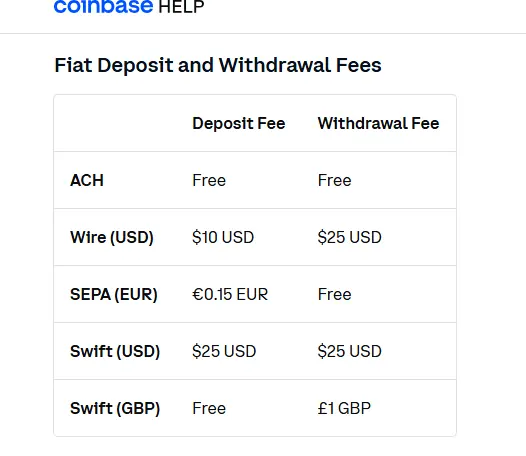
Cash funding and withdrawals vary by method: Exchange ACH is free, while USD wires cost $10 to deposit and $25 to withdraw.
Here’s a quick reference:
| Deposit Method | Fee |
| ACH Bank Transfer (US) | Free |
| USD Wire Transfer | $10 |
| Debit Card | ~3.99% |
| Cryptocurrency Deposit | Free (network fees may apply) |
| PayPal | Varies |
Debit card purchases carry a 3.99% fee. Cryptocurrency deposits are free across all supported assets.
My experience was that ACH is the obvious choice for most US users; it’s free, widely supported, and the settlement time is reasonable. Debit card deposits are convenient if you need to act fast on a market move, but paying 3.99% on the way in is a steep price for speed.
6. Withdrawal Fees
Withdrawal fees are where things get a bit messier, and Coinbase gets some fair criticism here.
Coinbase Advanced Trade charges network-dependent withdrawal fees that can range from $0.50 for certain altcoins to $15–$25 for Bitcoin during high congestion periods.
For fiat withdrawals:
| Withdrawal Method | Fee |
| ACH (US) | Free |
| USD Wire | $25 |
| Crypto (varies by network) | Network fee applies |
| USDT Withdrawal | 0.01% (capped at 20 USDT) + network fee |
Bitcoin sent over Lightning carries a 0.2% processing fee, offering faster transfers without standard on-chain Bitcoin transaction costs. Coinbase charges 0.01% on USDT withdrawals, capped at 20 USDT, plus a separate network transaction fee per withdrawal.
I found that timing your withdrawals matters more than people realise. During high-traffic periods — like major market events or bull run peaks, Bitcoin network fees can spike significantly. If you’re moving a small amount of BTC, that network fee can eat a notable percentage of your transaction. Patience, in this case, is literally profitable.
7. Hidden Charges Explained
Let’s talk about the stuff Coinbase doesn’t put in the headline numbers. These aren’t secret fees exactly; they’re disclosed in the fine print, but they catch a lot of users off guard.
The Spread Problem
Coinbase’s simple buy/sell interface includes a spread of approximately 0.50% on every cryptocurrency purchase, with that spread widening to approximately 2% during high volatility.
This is the big one. When you use the simple Coinbase interface, you’re not just paying the trading fee — you’re also paying a spread baked into the quoted price. You’ll see a preview price, but that price already includes the spread. The fee line shows one number; the real cost is higher.
Gas Fees on DEX Trades
If you’re using Coinbase’s DEX trading feature, you’ll encounter gas fees separate from the platform fee. In addition to the standard Coinbase fee, Coinbase may charge an additional service fee for transactions that occur on decentralised exchanges (DEXs) with our DEX Trading feature.
Large USDC Conversion Fee
This one surprises institutional users. Consumer accounts pay 0.10% on net USDC conversions above $5 million in 30 days. If you’re moving large stablecoin positions, this is worth tracking.
Coinbase One Misunderstanding
Many people assume that subscribing to Coinbase One means zero Coinbase fees on all trades, but that’s not entirely the case. The zero-fee benefit only applies to “simple” trades. For advanced trading, the regular tiered fee structure still applies.
This trips up a lot of subscribers. The fine print matters here.
8. How to Reduce Coinbase Fees
Good news: there are several legitimate, well-tested ways to bring your Coinbase fees down. Here’s what actually works in practice.
Switch to Coinbase Advanced Trade
This is step one for anyone who isn’t already using it. Switch to Advanced Trade: Coinbase Advanced uses maker-taker pricing from 0.00% to 0.40% maker and 0.04% to 0.60% taker, without embedded order-book spreads.
Migrating from the standard interface to Advanced Trade can cut your fees by 50% or more on the same trade. There’s no additional cost to access it — it’s built into your Coinbase account.
Use Limit Orders
On Coinbase Advanced Trade, any limit order that does not execute immediately is treated as a maker order and receives the lower maker fee. A market order is always a taker order.
The difference between maker and taker fees at the entry tier is substantial — 0.60% maker vs. 1.20% taker. For a $5,000 trade, that’s $30 vs. $60. Just for being patient enough to set a limit price instead of hitting the market.
Fund with ACH, Not Debit Card
Use free bank transfer rails: ACH in the United States is free. Skip card-funded purchases: debit and credit card buys are convenient, but payment-method charges can be much higher than standard bank transfer routes.
Consider Coinbase One (If the Math Works)
The Coinbase One subscription service offers zero trading fees up to a monthly cap of $10,000 for digital currency. If you trade more than that amount, you’ll be charged Coinbase’s regular fees.
The Preferred tier costs $29.99/month. If your trading fees normally exceed $30/month and you stay under the $10,000 monthly limit, Coinbase One pays for itself. Do the math for your own trading volume before subscribing.
Consolidate Volume to Climb Tiers Faster
Consider Coinbase One carefully if you trade often. Traders approaching volume tier thresholds should consider consolidating trading activity to reach the next discount level.
If you’re close to a volume threshold, focusing your trading on Coinbase rather than splitting across exchanges can push you into a lower fee tier and save money over the long run.
9. Coinbase Fees vs Other Exchanges
Let’s put the numbers in context. Coinbase is not the cheapest exchange — but it’s also not the worst. Here’s how it stacks up:
| Exchange | Base Maker Fee | Base Taker Fee | Notable Discount |
| Coinbase Advanced | 0.60% | 1.20% | Volume tiers, Coinbase One |
| Binance.US | 0.00% | 0.02% | BNB discount |
| Kraken Pro | 0.25% | 0.40% | Volume tiers, maker rebates |
| Gemini ActiveTrader | 0.20% | 0.40% | Volume tiers |
| Bitget | 0.01% | 0.01% | BGB token discount (up to 80%) |
| Bybit | 0.10% | 0.10% | Market maker rebates |
Binance.US charges 0% maker fees and 0.02% taker fees on every spot trading pair, from the first trade, with no volume requirements. Coinbase Advanced, by contrast, starts at 0.60% maker and 1.20% taker for accounts with less than $1,000 in 30-day volume.
That’s a significant gap at the entry level. However, what Coinbase brings to the table is regulatory standing, US-based compliance infrastructure, and arguably the strongest trust signal of any exchange operating in the American market. For many users, especially those who are tax-conscious or institutional, that matters.
Kraken is one of the strongest lower-fee alternatives for many users. Kraken’s instant buy and sell feature charges a fixed 1% trading fee, while Kraken Pro uses a volume-based maker-taker model that starts at 0.25% maker and 0.40% taker, with lower rates available at higher volume tiers.
The bottom line on comparisons: if keeping fees as low as possible is your only priority, Binance. US or Bitget will likely beat Coinbase at most volume levels. If you value regulation, US compliance, ease of use, and brand trust, Coinbase’s fee premium may be worth it for you.
10. How to Reduce Your Coinbase Fees (Advanced Tactics)
Beyond the basics, here are some tactics that active Coinbase users use to squeeze more efficiency out of the platform.
Use the VIP Fee Upgrade Program
VIP and high-volume traders who use other crypto exchanges can now get upgraded to lower fee tiers by providing proof of their trading volume, allowing them to trade with lower fees on Coinbase Advanced from the start. Qualified traders will be upgraded to a fee tier with lower fees than they were paying at their current exchange within five business days. Upgraded traders will maintain this lower fee for 60 days, and then their monthly trading volume on Coinbase will determine their ongoing fee tier.
This is a genuinely underused feature. If you’re a high-volume trader migrating from another exchange, you can fast-track to lower tiers without starting from scratch.
Trade Stablecoin Pairs When Possible
Maker fees for eligible stablecoin pairs start at 0.00% on Coinbase Advanced. If your strategy allows for stablecoin-to-stablecoin trades, the cost savings are real and immediate.
Time Large Crypto Withdrawals
Network congestion directly impacts your withdrawal costs for Bitcoin and Ethereum. Tools like mempool. Space lets you monitor Bitcoin network fees in real time. Waiting for low-congestion periods, typically late at night or on weekends, can meaningfully reduce your withdrawal cost.
Review Coinbase One Tiers Carefully
Coinbase One has three tiers: Basic ($4.99/month), Preferred ($29.99/month), and Premium ($299.99/month). The Basic plan starts at $4.99/month. Preferred and Premium members receive a 25% rebate on all Coinbase Advanced spot trading fees, paid in USDC.
If you’re an active Advanced Trade user, the 25% rebate on spot trading fees available to Preferred and Premium members can add up quickly. Run the numbers on your own monthly trading volume to see which tier, if any, makes financial sense.
11. Are Coinbase Fees Worth It?
Honestly? It depends entirely on what you’re using Coinbase for.
For complete beginners: Coinbase’s simple interface comes at a fee premium, but the tradeoff is an intuitive experience, deep regulatory trust, and a UI that doesn’t overwhelm you with order books on day one. If you’re buying and holding with low frequency, the higher fees might be acceptable given the peace of mind.
For intermediate traders: The moment you switch to Coinbase Advanced Trade, the fee equation changes significantly. Using limit orders, funding via ACH, and hitting volume tiers make Coinbase’s fees genuinely competitive — not best in class, but not embarrassing either.
For active or high-volume traders: The volume-based fee tiers are attractive at scale. Coinbase Advanced fees reach 0.00% maker and 0.05% taker at $250 million or more in volume. For institutional traders, the combination of competitive rates and Coinbase’s regulatory infrastructure is a real advantage.
For fee-hunters above all else: If your only priority is the lowest possible fee, there are cheaper exchanges. Binance. US, Bybit, and Bitget all offer lower base rates. But lower fees at a less regulated exchange are a risk calculation, not just a savings calculation.
12. Pros and Cons
13. FAQ Section
Q: What is the Coinbase Advanced Trade fee for a beginner?
At the entry level (under $1,000 in 30-day volume), Coinbase Advanced Trade charges 0.60% for maker orders and 1.20% for taker orders. These are higher than many competitors at the base tier but decrease as your monthly volume grows.
Q: Does Coinbase One eliminate all fees?
No. The zero-fee benefit only applies to “simple” trades. For advanced trading, the regular tiered fee structure still applies. Spreads also still apply on eligible simple trades even for Coinbase One members.
Q: Are crypto deposits free on Coinbase?
Yes. Cryptocurrency deposits are free across all supported assets. However, blockchain network fees may apply when sending crypto from an external wallet.
Q: What’s the cheapest way to buy crypto on Coinbase?
Use Coinbase Advanced Trade, fund via ACH bank transfer, and place limit orders (maker orders). This combination gives you the lowest possible fees on the platform.
Q: How does Coinbase compare to Binance for fees?
Binance.US charges 0% maker fees and 0.02% taker fees on every spot trading pair from the first trade. Coinbase Advanced starts at 0.60% maker and 1.20% taker for accounts with less than $1,000 in 30-day volume. Binance is cheaper at every comparable volume tier, but regulatory and compliance considerations differ significantly.
Q: What is the Coinbase liquidation fee for futures?
If your position gets liquidated, Coinbase charges 0.80% per transaction. This is in addition to any standard futures trading fees and is worth building into your risk calculations before opening leveraged positions.
Q: Does Coinbase charge inactivity fees?
No. Coinbase does not charge inactivity fees on dormant non-trading accounts.
Q: Is Coinbase One worth it?
If you plan on trading less than $10,000 per month and your fees would total more than the cost of a monthly subscription, then it’s probably worthwhile to pay for Coinbase One for the zero trading fees. Run the numbers on your specific trading volume and compare to the subscription cost.
14. Final Verdict
Coinbase is not the cheapest exchange on the market, and this Coinbase fees review won’t pretend otherwise. But “cheap” and “worth it” are different questions.
What Coinbase offers , and charges for, in part , is regulatory credibility, a deeply intuitive user experience, institutional-grade infrastructure, and one of the most transparent fee preview systems in the industry. That has genuine value, especially for users operating in regulated jurisdictions or managing significant assets.
The real story is this: most of the criticism around Coinbase fees is aimed at the simple interface, and that criticism is fair. But the moment you move to Coinbase Advanced Trade and start placing limit orders funded via ACH, the picture changes significantly. The fees remain above Binance and Bitget at entry levels, but they’re competitive enough for most retail traders , and the regulatory premium is real.
Who Coinbase is best for:
- Beginners who prioritise ease of use and trust over rock-bottom fees
- US-based traders who value regulatory compliance
- Moderate-frequency traders who can benefit from Coinbase One
- Institutional traders who need a robust compliance infrastructure
Who should look elsewhere:
- Pure fee-hunters with high volume who don’t need US regulatory standing
- Traders seeking access to a wide range of newer or niche tokens
- Users whose entire strategy depends on minimising cost at every tier
The simple math: Switch to Advanced Trade, use limit orders, fund with ACH, and Coinbase becomes a reasonable place to trade. Stick with the simple interface and high-fee payment methods, and you’ll pay a premium that adds up fast.
Overall Rating: 6.7 / 10 — Trustworthy, improving, but still carries a fee premium that informed traders can largely avoid.
15. Disclaimer
This article is for informational purposes only and does not constitute financial or investment advice. Cryptocurrency trading carries significant risk, including the potential loss of capital. Fee structures on exchanges can change without notice — always verify current rates directly on Coinbase’s official website before making trading decisions. The author and publisher are not affiliated with Coinbase and receive no compensation from Coinbase for this review.
“`json { “@context”: “https://schema.org”, “@type”: “FAQPage”, “mainEntity”: [ { “@type”: “Question”, “name”: “What is the Coinbase Advanced Trade fee for a beginner?”, “acceptedAnswer”: { “@type”: “Answer”, “text”: “At the entry level (under $1,000 in 30-day trading volume), Coinbase Advanced Trade charges a 0.60% maker fee and a 1.20% taker fee. These rates decrease as your monthly trading volume increases.” } }, { “@type”: “Question”, “name”: “Does Coinbase One eliminate all fees?”, “acceptedAnswer”: { “@type”: “Answer”, “text”: “No. Coinbase One only removes trading fees on eligible simple trades. Advanced Trade still uses the standard maker-taker fee schedule, and spreads may still apply on eligible simple trades.” } }, { “@type”: “Question”, “name”: “Are crypto deposits free on Coinbase?”, “acceptedAnswer”: { “@type”: “Answer”, “text”: “Yes. Coinbase does not charge fees for cryptocurrency deposits. However, blockchain network fees may apply when transferring crypto from an external wallet.” } }, { “@type”: “Question”, “name”: “What’s the cheapest way to buy crypto on Coinbase?”, “acceptedAnswer”: { “@type”: “Answer”, “text”: “The lowest-cost method is to use Coinbase Advanced Trade, fund your account via a free ACH bank transfer, and place limit (maker) orders to qualify for lower trading fees.” } }, { “@type”: “Question”, “name”: “How does Coinbase compare to Binance for fees?”, “acceptedAnswer”: { “@type”: “Answer”, “text”: “Binance.US starts with 0% maker fees and 0.02% taker fees, while Coinbase Advanced begins at 0.60% maker and 1.20% taker for users with less than $1,000 in monthly trading volume. Binance is generally cheaper, while Coinbase emphasizes regulatory compliance and ease of use.” } }, { “@type”: “Question”, “name”: “What is the Coinbase liquidation fee for futures?”, “acceptedAnswer”: { “@type”: “Answer”, “text”: “Coinbase charges a 0.80% liquidation fee per transaction when a futures position is liquidated. This fee is separate from standard futures trading fees.” } }, { “@type”: “Question”, “name”: “Does Coinbase charge inactivity fees?”, “acceptedAnswer”: { “@type”: “Answer”, “text”: “No. Coinbase does not charge inactivity fees on dormant or non-trading accounts.” } }, { “@type”: “Question”, “name”: “Is Coinbase One worth it?”, “acceptedAnswer”: { “@type”: “Answer”, “text”: “Coinbase One can be worthwhile if you trade less than $10,000 per month and your monthly trading fees would otherwise exceed the subscription cost. Compare your expected trading volume and fees before subscribing.” } } ] } “`