
You spend three hours setting up the perfect trade entry point, stop-loss, and take-profit — and then you go to sleep. You wake up the next morning and find out the price hit your exact target at 3 AM, bounced perfectly, and then reversed. But you were asleep. So you missed it entirely.
This is not a hypothetical. Tuesday is the day for most crypto traders.
Cryptocurrency markets never pause. They run around the clock, across time zones, without any concern for your work schedule, your family commitments, or your basic need for sleep. Manual trading against a 24/7 market is a battle you will eventually lose — not because of lack of skill, but because of lack of hours.
That is exactly what a MEXC trading bot is built to solve; whether you think of it as a “trading bot for MEXC,” a “MEXC trade bot,” or just MEXC bot trading in general, it’s the same underlying toolset.
MEXC — officially MEXC Global, and formerly known in its early years as MXC — is one of the fastest-growing cryptocurrency exchanges in the world, listing over 1,700 cryptocurrencies across spot and futures markets. Beyond trading, MEXC has built a suite of native automated trading tools directly into its platform: no third-party subscriptions, no complex API configuration, no extra layer of trust required.
But does it actually deliver? That’s what this MEXC trading bot review is here to determine. We’ll cover every native bot strategy in detail, break down real features and genuine limitations, walk through setup step by step, and give you an honest verdict on whether the MEXC trading bot deserves a place in your toolkit.
What Is the MEXC Trading Bot?

The MEXC trading bot is a built-in, free automated trading tool available directly on the MEXC exchange. It lets traders execute pre-defined strategies automatically, buying and selling based on rules you configure in advance, without needing to monitor the market around the clock.
Unlike many third-party trading bot platforms that require you to generate API keys, connect external accounts, and trust a separate company with access to your funds, MEXC’s native bots live inside the exchange itself. Your funds stay in your MEXC account at all times. No external wallets, no separate dashboards, no monthly subscription bills.
This is where the MEXC trading bot free model matters: MEXC’s grid and DCA bots cost nothing beyond standard trading fees. There’s no premium tier, and no bot subscription to cancel later.
The primary bot strategies natively available are:
- Spot Grid Bot
- Futures Grid Bot
- DCA Bot (Dollar-Cost Averaging — see DCA bot settings below)
- Signal Bot (for MEXC trading signals from TradingView)
- Copy Trading
Each strategy targets a different market condition and trader type. Understanding which tool fits which environment is the first skill in automated trading, and we’ll walk through each one below.
How Does the MEXC Trading Bot Actually Work?
Before breaking down individual strategies, it helps to understand what all MEXC trading bots have in common.
Every bot follows the same core logic: you define the rules, and the bot executes them. You set your trading pair, investment amount, price parameters, and risk limits. The bot then monitors the market continuously and places buy and sell orders based on the conditions you defined, whether you’re watching or not.
MEXC bots run with machine-like consistency, executing strategies regardless of psychological pressure. They don’t panic. They don’t get greedy. They don’t hold a position too long because they “have a feeling.” They just follow the rules.
When setting up any bot, you have two configuration paths:
AI Mode (MEXC AI Trading Bot): MEXC’s AI engine analyzes historical market data and real-time price trends for your chosen pair, then automatically sets the optimal price range, number of grids, and leverage multiplier. This is the fastest route for beginners who want a MEXC AI trading bot experience without deep technical knowledge.
Manual Mode: You define every parameter yourself: price range, grid count, investment amount, leverage, stop-loss, and take-profit. This gives experienced traders full control over every part of the strategy.
Both modes sit in the same interface. Pick a pair, choose your strategy, configure settings, launch. The bot keeps running in the cloud until you stop it manually or it hits a preset limit.
MEXC Trading Bot Strategies: A Full Breakdown
1. Spot Grid Bot – Profit From the Noise
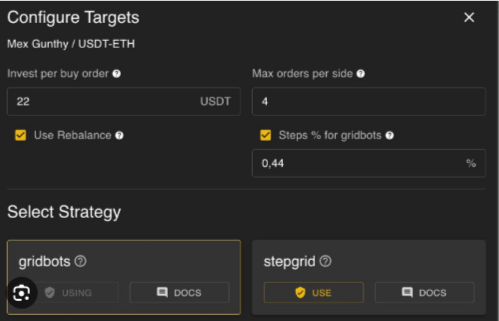
The Spot Grid bot is the most commonly used MEXC grid trading bot, and it operates on a simple premise: crypto prices don’t move in straight lines. They oscillate, bounce, and move up and down repeatedly, even inside a longer trend.
Grid trading exploits this by placing buy orders below the current price and sell orders above it, at evenly spaced intervals — the “grid.” Every time price drops to a buy level and recovers to the next sell level, the bot completes a profitable cycle and captures the spread.
A real example: Set up a Spot Grid bot on ETH/USDT with a lower limit of $2,000 and an upper limit of $2,600, using 12 grid levels. The bot places a buy order every $50 below the current price and a sell order every $50 above it. Each time Ethereum dips and recovers — which it does constantly- the bot collects the $50 spread. Multiply that across dozens of cycles, and you see why grid trading appeals to systematic traders.
The Spot Grid bot performs best in range-bound, sideways markets , the kind where prices move around without committing to a clear direction. Where it underperforms: strong trending markets. If price breaks decisively above or below your grid range, the bot stops completing profitable cycles, and during a sharp downtrend it can keep accumulating a falling asset without finding sell orders to close the loop. A properly configured stop-loss protects against this and is not optional; it’s essential.
The Spot Grid bot also runs in three directional modes:
- Neutral: best for sideways markets with frequent fluctuations and no clear trend.
- Long: for markets trending upward, capturing gains as price climbs.
- Short: for markets trending downward, profiting as price declines through the grid.
2. Futures Grid Bot – Grid Trading With Leverage (MEXC Futures Trading Bot)

MEXC officially launched the Futures Grid Bot on May 21, 2025, extending its native automation into leveraged markets.
The Futures Grid bot uses the same core grid logic as the Spot Grid bot, but on the futures market — which adds leverage and the ability to profit from both rising and falling markets. It supports Neutral, Long, and Short modes, and there are no fees for bot creation or operation; actual futures trading incurs standard funding and trading fees only.
Leverage is the defining feature here. MEXC offers up to 500x leverage on major pairs like BTC/USDT and ETH/USDT. That deserves a direct, honest statement: using high leverage is extremely dangerous, especially for traders still learning how bots behave.
The math: at 10x leverage, a 10% adverse move liquidates your position entirely. At 100x leverage, a 1% move does the same. Crypto assets routinely move 5–10% in a single day. A MEXC futures trading bot running aggressive leverage is not an automated income machine; it’s a highly amplified risk tool.
Used with discipline, low leverage, sensible position sizing, and tight stop-losses, the Futures Grid bot lets experienced traders extract value from both sides of the market in a way the Spot Grid bot can’t.
Tip: Use Isolated Margin to cap your maximum possible loss to only the capital allocated to that specific position, so one bad trade can’t cascade into your full account balance.
3. DCA Bot – Consistent Accumulation Without the Stress
TheDCA (Dollar-Cost Averaging) bot is the most beginner-friendly tool in MEXC’s automation suite.
The concept: instead of trying to time the perfect entry, which essentially no one can do consistently- you buy a fixed amount of an asset at regular intervals regardless of price. Buy $100 of Bitcoin every Monday. Buy $50 of Ethereum every three days. Price goes up or down; the bot buys anyway.
Over time, this averages out your entry price. You buy some units at peaks and some at troughs, and the average lands somewhere in the middle, which is exactly what every long-term investor knows they should do but struggles to execute consistently because of emotion, particularly the urge to “wait for a better price” indefinitely.
Where the DCA bot struggles: prolonged, severe bear markets where the asset keeps falling without meaningful recovery. In that scenario, it keeps buying a declining asset, compounding losses. The critical protection is asset selection; only DCA into assets you genuinely believe will recover long-term. Using it on low-quality speculative tokens risks “averaging into zero.”
4. Signal Bot – Trade on MEXC Trading Signals
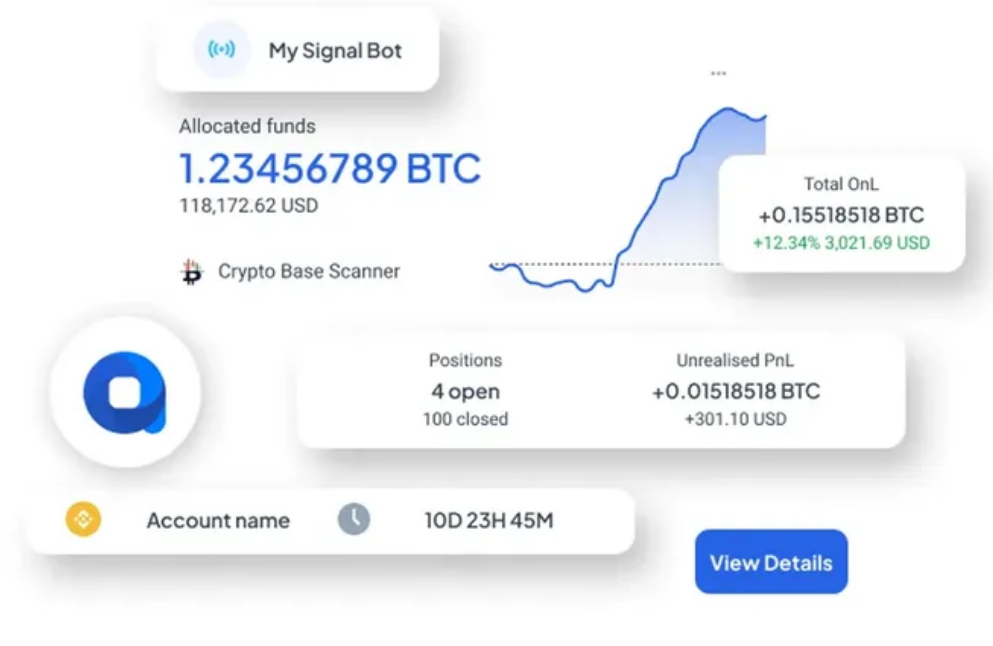
The Signal Bot is a step up in sophistication from Grid and DCA. Instead of following a fixed mechanical rule, it executes trades based on external signals, alerts triggered by technical indicators, trading platforms, or third-party providers.
The most common setup connects the Signal Bot to TradingView alerts, letting you write conditions like “buy when RSI drops below 30 on the 4-hour chart” or “sell when MACD crosses bearish.” When that condition fires, TradingView sends the alert and the MEXC Signal Bot executes the order automatically, turning any technical strategy into automated MEXC trading signals without writing code or manually executing every trade.
This tool suits traders who already have a tested strategy and want to remove manual execution. It’s less appropriate for beginners still developing market understanding, since a bad signal strategy automated at scale can execute losses faster than manual trading.
5. Copy Trading – Learn by Automating Someone Else’s Moves (MEXC Copy Trading Review)
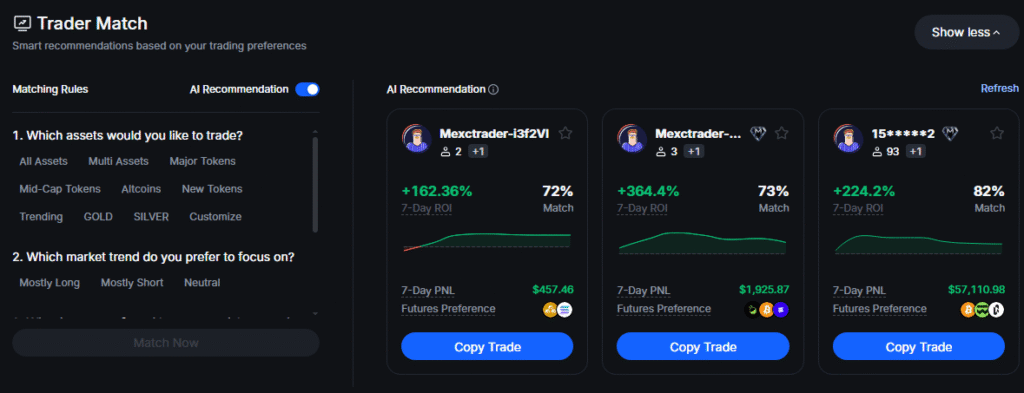
Copy Trading is MEXC’s most accessible feature for traders who are new to the market or simply want a hands-off approach.
You browse a leaderboard of experienced traders, review their performance history and risk profile, and allocate a portion of your capital to automatically mirror their trades. When they open a position, yours opens proportionally; when they close, yours closes too.
One caveat deserves emphasis in any honest MEXC copy trading review: past performance doesn’t guarantee future results. A trader who performed exceptionally in a bull market may perform very differently in a sideways or bearish one. Always review a copied trader’s full history across different market conditions, not just their best months, and treat Copy Trading as a learning tool with a small allocation, not a primary wealth-building strategy.
Key Features That Make MEXC Trading Bots Stand Out
Zero Subscription Fee – A Genuine Cost Advantage
Most dedicated third-party trading bots charge monthly subscriptions: 3Commas starts around $37/month, Cryptohopper ranges from $19–$107/month, and Bitsgap runs $23–$151/month. These fees compound and come out of your capital before a single profitable trade occurs.
MEXC’s grid and DCA bots are completely free to use; you only pay standard MEXC trading fees on executed orders, the same as any manual trade. No premium tier, no feature paywalls, no subscription renewals.
AI-Powered Parameter Suggestions (MEXC AI Trading Bot)
When you select AI mode in the Grid Bot setup, MEXC analyzes historical and real-time price data for your pair and automatically suggests the optimal price range, grid count, and leverage level, no manual calculation required. The AI also supports Neutral, Long, and Short modes, aligning suggestions with your directional view. This makes the bots accessible to beginners while letting experienced traders override every suggestion.
TradingView-Powered Charting Integration
MEXC integrates TradingView charting directly into its interface, with multiple chart types, indicators, and drawing tools. For bot users, this means visually overlaying grid levels on the live price chart, immediately showing whether your range is too tight, too wide, or well-positioned.
Competitive Trading Fees With Discount Structure
Spot trading fees stand at 0.05%, meaningfully below the industry standard. Futures fees run 0.02% (maker) / 0.06% (taker). A grid bot running 20 cycles a day on a $500 allocation at 0.05% generates roughly $0.50 in daily fees — about $15/month, which is the full cost of automation in that scenario. Holding at least 500 MX tokens unlocks a 50% discount on both spot and futures fees.
Copy Trading as a Native Feature
Most exchanges offer trading bots or copy trading, rarely both, and seldom natively in the same platform. MEXC provides both side by side, giving traders a genuine range of automation approaches from fully manual (Signal Bot) to fully delegated (Copy Trading).
MEXC Trading Bot: Honest Pros and Cons
Pros
- Completely free to use — no subscription fees, only standard trading fees on executed orders.
- Multiple native strategies — Spot Grid, Futures Grid, DCA, Signal Bot, and Copy Trading all live inside the exchange.
- AI-powered setup — beginners can launch in minutes with AI-suggested parameters and directional mode selection.
- Competitive trading fees — 0.05% spot, with further discounts via MX token holdings.
- TradingView integration — visual chart overlay makes grid positioning and tuning far more intuitive.
- Copy Trading included — a native feature most competing exchanges don’t offer alongside their bot suite.
- Huge asset selection — over 1,700 cryptocurrencies listed.
- Cloud-based operation — bots run 24/7 without your device staying active.
Cons
- Futures leverage risk is severe. Up to 500x leverage represents extreme risk that isn’t always communicated loudly enough during setup.
- Signal Bot requires existing strategy knowledge. It’s only as good as the signals feeding it.
- Copy Trading past performance isn’t a guarantee. Beginners sometimes allocate too much capital without understanding this.
- Native bots lack deep customization. Traders wanting complex multi-stage logic or cross-exchange automation will find the native bots limiting.
- No dedicated desktop Pro interface. Chart integration exists, but bot management is primarily web-based.
Read more: Is MEXC Safe or Scam? (2026) ·
MEXC Fees Explained: Spot, Futures & Withdrawal Fees (2026) ·
MEXC Review for Beginners 2026
How to Set Up the MEXC Spot Grid Bot: Step-by-Step
The Spot Grid bot is the best starting point for most new MEXC bot users.
- Log in to your MEXC account. No KYC is required to register or access basic trading, though higher withdrawal limits require verification.
- Find the trading bot section. From the main navigation, look for “Trade” → “Bot Trading,” or access it directly from the spot/futures trading interface.
- Select Spot Grid. You’ll see a live chart alongside a parameter configuration panel.
- Choose your trading pair. BTC/USDT or ETH/USDT are the safest starting points given their liquidity and established ranges.
- Choose AI Mode or Manual Mode. In AI Mode, select Neutral, Long, or Short and let MEXC’s engine suggest the range and grid count. In Manual Mode, set your upper/lower limits, grid count, and investment amount yourself. If you’re new, start with AI mode in Neutral and watch it run for a week before customizing.
- Configure risk controls. Add a stop-loss below your lower grid limit; this is the mechanism that prevents the bot from buying a falling asset all the way to zero. Optionally set a take-profit level.
- Review and launch. Verify price range, grid count, investment, and risk settings, then click “Create Bot.” The dashboard shows completed trades, live P/L, and status, and you can pause or stop the bot anytime.
How to Set Up the MEXC DCA Bot: Step-by-Step (DCA Bot Settings)
Setting up a DCA bot involves fewer decisions than the Grid bot.
- Navigate to Bot Trading → DCA.
- Select your asset. Choose a cryptocurrency you believe in for the long term — not a speculative token.
- Set your investment amount per interval. $20, $50, $100 — whatever fits your budget. Consistency matters more than the exact amount.
- Set your purchase interval. Daily, every 3 days, or weekly — pick something that doesn’t over-concentrate purchases in a short window.
- Set a take-profit target (optional). Auto-sell your accumulated position once profit reaches a defined percentage, or leave it open-ended.
- Launch the bot. Review and confirm — the first buy executes immediately, and subsequent purchases follow your schedule automatically.
Is the MEXC Trading Bot Safe?
Safety in automated trading has two layers: fund security and the risk profile of the strategy itself.
Fund security: MEXC’s native bots operate entirely within your MEXC account. No third-party service has access to your funds, no external wallets are involved, and no API keys leave your control. Your capital’s security still depends on your account hygiene: enable two-factor authentication, use a strong, unique password, and set up MEXC’s anti-phishing code. MEXC also supports IP restriction on API keys for anyone extending automation beyond native bots.
Strategy risk: No bot eliminates market risk. Grid bots accumulate positions in falling markets without stop-losses. DCA bots buy declining assets on schedule. Futures bots with high leverage can liquidate rapidly on adverse moves. The bot doesn’t make your decisions safer; it executes your decisions faster and more consistently, which means a bad strategy runs efficiently rather than sloppily.
The safest approach: start with small capital, use conservative parameters, always configure a stop-loss, and treat the first month as a learning exercise, not a profit target.
Who Should Use the MEXC Trading Bot?
Best suited for:
- Traders already on MEXC who want to automate simple strategies without paying for external tools.
- Long-term investors who want to automate DCA purchases on assets they believe in.
- Intermediate traders with tested strategies who want signal-based automated execution.
- Beginners who want to learn by following experienced traders through Copy Trading, with a small, capped allocation.
Not ideal for:
- Traders who want API-level control over bot logic, multi-stage execution, or cross-exchange automation.
- Users planning to run high leverage on the Futures Grid bot without understanding margin, liquidation, and risk management.
- Traders looking for a Martingale or Smart Rebalance strategy natively; these aren’t currently available on MEXC and would require third-party tools connecting via API.
MEXC Trading Bot vs. Competitors
| MEXC | KuCoin | 3Commas | Pionex | |
| Subscription cost | Free | Free | From ~$37/mo | Free |
| Bot types | Spot Grid, Futures Grid, DCA, Signal, Copy Trading | Grid, DCA, Martingale, Smart Rebalance | Grid, DCA, advanced/custom | 16+ built-in bots |
| Copy trading | Yes (native) | No | Yes (paid) | No |
| Spot trading fee | 0.05% | 0.10% | N/A (per-exchange) | Varies |
| Max leverage (futures bot) | Up to 500x | Lower | N/A (connects to exchanges) | Lower |
| Best for | Cost-conscious traders wanting an all-in-one native suite | Strategy variety (Martingale, Rebalance) | Advanced/cross-exchange customization | Native bot variety |
For traders already on MEXC who want to start automating without added complexity or cost, the native bot suite is the right starting point. Moving to third-party tools makes sense only once you identify a specific feature, like Martingale, Smart Rebalance, or cross-exchange logic, that native bots can’t provide.
Common Mistakes Traders Make With MEXC Bots
- Launching a grid bot without a stop-loss. The most consequential mistake in grid trading. If your grid runs $2,000–$2,600 on ETH and price drops to $1,400 with no stop-loss, the bot has deployed all your capital into a declining asset with no automatic exit.
- Using the DCA bot on low-quality assets. DCA assumes the asset will recover and grow over time — true for BTC and ETH, not for thin-liquidity speculative tokens.
- Over-leveraging on the Futures Grid bot. The 500x ceiling exists, but using it is a reliable path to rapid liquidation. Keep leverage at 2x–5x when first running a Futures Grid bot.
- Misreading Copy Trading leaderboard metrics. A top-of-leaderboard trader this month may have made one lucky leveraged bet, not built a repeatable strategy. Review full history, max drawdown, and time active before copying.
- Setting too many grids with insufficient capital. Spreading $150 across 50 grid levels makes each order (and each profit) too small to matter after fees. Fewer grids with larger per-grid capital perform better for smaller accounts.
Understanding MEXC Trading Fees in the Context of Bots
MEXC’s spot trading fee sits at 0.05%, one of the lowest in the industry. Futures fees run 0.02% (maker) / 0.06% (taker).
To make this concrete: a Spot Grid bot running 15 cycles a day on a $300 USDT allocation at 0.05% generates roughly $0.225 in daily fees, about $6.75/month, the total cost of running the bot in a typical small-account scenario. Compare that to a third-party platform charging $37/month before a single trade executes.
MEXC’s MX token discount adds further value: holding 500+ MX tokens unlocks a 50% discount on both spot and futures fees, worth calculating against the cost of acquiring and holding MX for active, high-frequency bot users.
Final Verdict: Is the MEXC Trading Bot Worth It?
After reviewing every strategy, feature, advantage, and limitation, here’s the straightforward conclusion:
The MEXC trading bot is a solid, cost-efficient automation tool that delivers genuine value — particularly for traders already on MEXC who want to start automating without adding subscription costs or external platform complexity.
The Spot Grid bot is well-designed and accessible. The DCA bot is one of the most sensible long-term accumulation tools on any exchange. The Futures Grid bot opens leveraged automation for experienced traders. The Signal Bot bridges technical analysis with automated execution. Copy Trading adds a social learning dimension most competing exchanges don’t offer natively.
The limitations are real: advanced traders wanting Martingale or Smart Rebalance won’t find them natively, users needing API-level bot control will need third-party tools, and the Futures Grid bot’s extreme leverage ceiling demands experienced, disciplined hands.
For most traders, especially those just entering automated trading, the MEXC bot suite is a well-rounded, genuinely free starting point with enough strategic variety to cover most market conditions.
Start with a small grid or DCA configuration, use conservative settings, set your stop-loss, and let the bot do what it does best: trade while you live your life.
This article is for informational purposes only and does not constitute financial or investment advice. Cryptocurrency trading involves significant risk, including the potential loss of principal. Always conduct your own research before making any investment decisions.
Frequently Asked Questions
Does the MEXC trading bot cost money? MEXC’s native Grid and DCA bots are completely free to use; the MEXC trading bot is, in that sense, genuinely a free product. There are no subscription fees or bot creation charges; you only pay the standard MEXC trading fee on each order the bot executes.
Is MEXC available for US residents? MEXC has historically had restrictions for US residents due to regulatory requirements. US traders should verify current availability and compliance before creating an account.
Which MEXC bot strategy is best for beginners? The DCA bot is the most beginner-friendly — simple setup, low risk, minimal ongoing decisions. The Spot Grid bot with AI-suggested parameters in Neutral mode is also a solid starting point for exploring range-based automation.
What is the MEXC spot trading fee? 0.05% per trade, with up to a 50% discount available for holders of 500+ MX tokens.
Can I run multiple MEXC trading bots simultaneously? Yes. You can run multiple bots across different pairs and strategies at once, each operating independently with its own parameters and risk settings.
Does the MEXC trading bot work 24/7? Yes — MEXC bots are cloud-based and run continuously without requiring your device to stay active.
What is the maximum leverage available on the MEXC Futures Grid bot? Up to 500x on major futures pairs like BTC/USDT and ETH/USDT. This carries extreme risk and should only be used by experienced traders who understand margin trading and liquidation.
Is there a MEXC trading bot on GitHub? MEXC’s native Grid, DCA, Signal, and Copy Trading bots are closed-source and built into the exchange; there’s no official MEXC bot repository on GitHub. What you will find on GitHub are third-party, community-built bots that connect to MEXC via its public API. These can offer more customization, but they’re unofficial: you’re trusting the code’s author and handing over API key access, so review the code (or have someone qualified review it) and use IP-restricted, trade-only API keys before connecting anything you didn’t build yourself.
Has MEXC had recent API or trading bot performance issues? Like any exchange, MEXC’s API and bot infrastructure can experience brief slowdowns or downtime during periods of extreme market volatility, which is when order execution matters most. There’s no evidence of a systemic, ongoing reliability problem specific to MEXC’s bots, but we’d recommend checking MEXC’s official status/announcement page before relying on a bot during high-volatility events, and treating any bot’s uptime as dependent on the exchange’s infrastructure , not something a stop-loss alone protects against.
What’s the difference between the MEXC AI trading bot and manual bot setup? The MEXC AI trading bot refers to “AI Mode” inside the Grid and Futures Grid bot setup; it auto-suggests price range, grid count, and leverage based on historical and real-time data for your chosen pair. Manual Mode is the same bot, but with every parameter set by you. Both use identical execution logic; only the parameter-setting method differs.
Is MEXC the same as MXC? Yes. MEXC was known in its early years as MXC before rebranding; it now operates under the official name MEXC Global. Searches for “MXC trading bot” and “MEXC trading bot” refer to the same platform and the same native bot suite described in this review.
